
Note: My premium training program, The SEO Playbook, will re-open soon to another 100 students. Learn more about the training and see what current students are saying here.
Today, I’m going to show you step-by-step how to promote your blog posts to get thousands of shares and drive waves of traffic to your site.
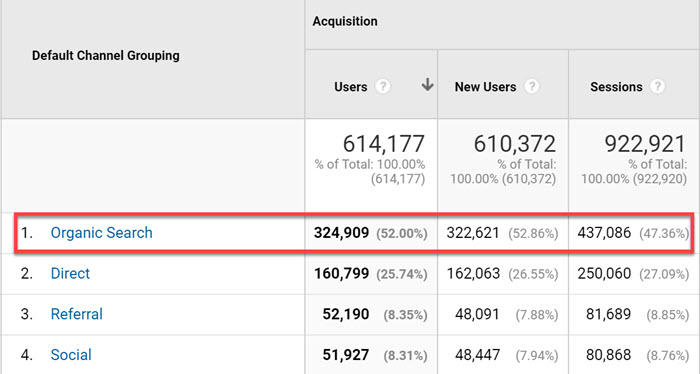
These are the exact tactics I’ve used to generate 922,921 visits and 33,417 social shares with just 33 blog posts:

And send almost 325,000 organic visitors to the blog:
The best part:
I’m going to show you how I did it with:
Zero connections.
A limited budget.
A brand spankin’ new blog.
While running my search marketing agency full-time.
With a solid game plan, the right tools and a little elbow grease, you can promote your blog posts and generate thousands of visits and social media shares on autopilot...
In any niche.
A Taste of What You'll Learn:
- How to use other people's content to drive traffic to your site
- How to 7x the traffic potential of every blog post
- The formula I used to get over 2,000 shares in 7 days
- How to build an ARMY of highly influential content advocates
- The tools I use to generate thousands of social shares and referral visits on complete autopilot...
This is a monster 12,000+ word blog promotion guide. Below you'll find a table of contents listing 41 actionable ways to promote your content.
Feel free to use the links to jump to a specific section of the post. There will also be links at the end of each section to quickly scroll back to the top of the post.
Blog Promotion techniques
Use the links below to jump to specific blog promotion techniques in the post:
22. Mentions
23. YouTube cards
24. Social pins
25. Scale what works
26. Seeded engagement
27. Sectional share links
28. Ego baiting
29. Strategic guest posting
30. ER framework
31. Twitter cards
32. Timing
33. Scoop.it
34. Social cadence
35. Gated sharing
36. Cite resources
37. Sumo share counts
38. Highlighter app
39. Simple shares
40. Strategic commenting
41. Custom audiences
41 Ways To Promote Your Blog Posts for INSANE Social Engagement and Traffic...
Below you will find a step-by-step walk through of each blog promotion tactic that will allow you to take them away and implement immediately on your site.
#1. Pick Low Hanging Keyword Targets (for Organic Wins)
Video: I'll walk you through a free Google Sheets template that you can use to automate most of the existing keyword research process. A huge time saver!
Keyword research is one of the most important aspects of any SEO campaign.
But, most people only perform keyword research one time -when they are starting a website.
This is a waste.
Improving rankings for keywords you’re already ranking for is the quickest and easiest way to get a TON more organic traffic to your website.
Think about it. Most of the organic traffic goes to the websites ranking in the top five positions in the SERPs:

If you’re able to move content already ranking bottom of page one, or bottom of page two, up just a few spots you could quickly see MASSIVE traffic gains.
Want proof?
I increased organic traffic 402% to this blog promotion guide 30 days after implementing this strategy:

With a simple relaunch, the post went from position #8 to #2 overnight.
Here’s another example where I increased organic traffic 51% in 30 days to this link building guide:

And here’s a more recent relaunch of my best keyword research tools roundup that saw a 86.88% month-over-month increase in organic pageviews:
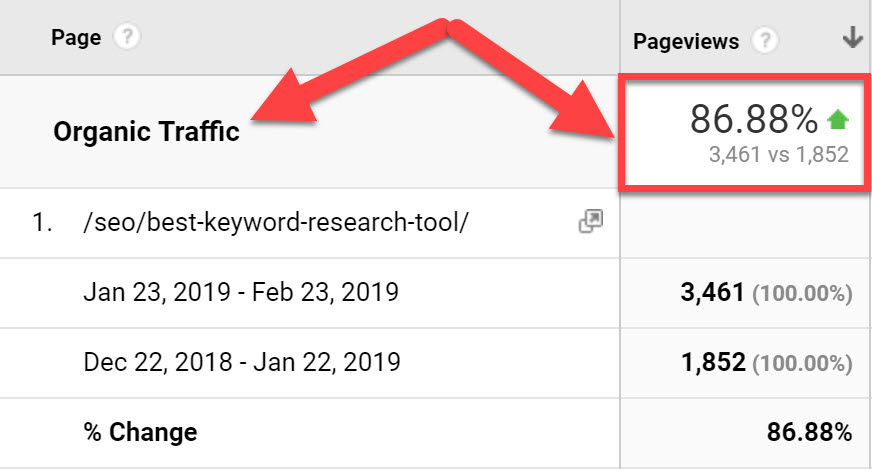
These are one-off examples. Imagine if you were able to scale this strategy across dozens or even hundreds of posts/pages on a blog. The compounded gains could be massive, and you don’t even have to write any new articles.
This is one of the first strategies I look at when taking on a new client with an existing website.
Here's how to do it:
- Identify “low-hanging” keyword opportunities (i.e. those already ranking bottom of page one or top of page two in the SERPs)
- Qualify the “quickest” win opportunities using several SERP data points
- Optimize the pages and relaunch for MASSIVE traffic boosts
Check out this post or watch the video below to get an in-depth look at the keyword research and relaunch process:
Editor’s Note: If you want to learn the exact keyword research processes I use to scale organic traffic for my clients, check out my premium training course, The SEO Playbook.
You’ll learn how to find, qualify, prioritize and map keyword data for sites of any size:

Screenshots of the Aggregate and Keyword Mapping tabs in The SEO Playbook.
#2: Find (and Fill) Important Content Gaps
Once you’ve tackled all the low hanging fruit, the next step is to identify new keyword opportunities for your blog.
One of the fastest ways to do this is perform a competitor content gap analysis.
Here’s how to do it:
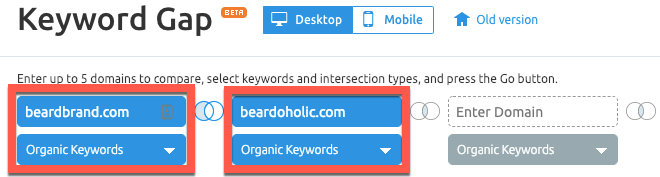
Go to the SEMrush Keyword Gap Tool (affiliate).
Enter up to five competitors:
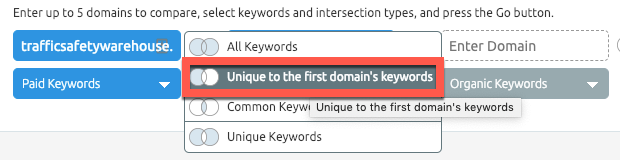
Select the “Unique to the first domain’s keywords” intersection:
Add an advanced filter to find the keywords in positions 11-20 that you could target:

You’ll get a list of high-volume keywords that your competitor ranks for in positions 11-20, that you could target:

You can also adjust the filter to only return the keywords your competitor is ranking for in the top 10 positions:

You’ll get a different set of terms to analyze:

Scan through the list, select any keywords that seem relevant to your blog, and add them to the Export Manager.
Editor’s note:
If you want to learn more advanced strategies, check out this competitor keyword research guide.
#3: Serve Compelling Offers with "Smart Links"
Email lists come in super handy for promoting new content.
With a couple of clicks in your email marketing software, you can tell thousands of subscribers about new content in seconds!
That’s why most blogs have email opt-ins like this:

A generic opt-in form housed in the sidebar.
Here-in lies the issue (and opportunity):
99% of bloggers show the same opt-in forms to both existing subscribers AND new visitors.
There’s literally ZERO point showing opt-in forms to existing subscribers...they’re already subscribed!
There’s literally ZERO point showing opt-in forms to existing subscribers...they’re already subscribed!
Enter Thrive Smart Links.
Smart Links—a nifty feature within Thrive Leads (full review here)—lets you show different content to new visitors vs. existing subscribers.
So, where new visitors will see the opt-in form in the sidebar (see screenshot above)...
Existing subscribers will see this:

Existing subscribers no longer see the redundant opt in offer.
But you can, and should, use the tool to take advantage of the valuable real estate in the sidebar.
Smart Links allows you to show different content to different segments of your email list:

For example, I could promote my list of best SEO tools to anyone interested in SEO. And promote my Thrive Leads review to a segment interested in building an email list.
You could also use Smart Links to promote related products, webinars and demos to quickly move people further down your marketing funnel.
For example:

In the example above, instead of removing the CTA altogether for existing subscribers, the site is showing an exclusive discount CTA to people on a related segment of their list.
There are dozens of ways you can use this tool to promote content and offers on your blog.
Here is a more in-depth breakdown from Shane MeLaugh, the founder of Thrive Themes (affiliate):
#4: Scrape Sharers for Quick Promotional Wins
Let me ask you a question:
Who are the people most likely to read and share your content?
[...]
The people who have done it before.
You can use these people to your advantage whenever you launch a piece of content.
Let me explain:
Those who have shared OR commented on your post clearly enjoyed it.
And this means that they’ll probably be interested in hearing about any updates/improvements you make to that post...
It’s just a case of reaching out and telling them!
BUT, you may be wondering…
“How do I find these people!?”
Here are two simple methods:
#1 — Finding (and promoting to) “sharers”:
Open up the Ahrefs Content Explorer (affiliate).
Enter the URL of the content you’re re-launching:
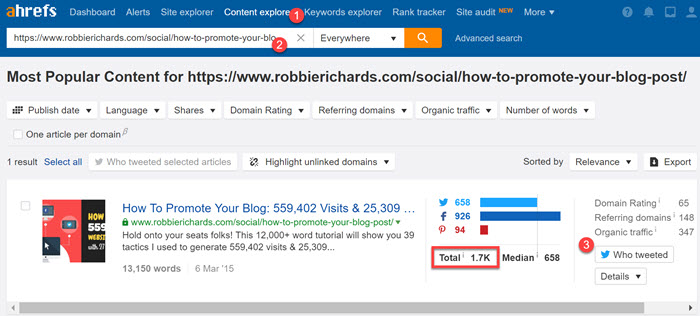
Click “Who Tweeted”.
You will now see a list of people who’ve shared your post in the past.
Not only does it tell you their name but also their Twitter username and website.
Click “Export”.

All the data will now be in a .csv file.
I like to upload this to Google Sheets to clean it up a bit...the only data we need is their name, Twitter handle, and website:

Next, get a VA to go through the spreadsheet and find the emails of all the folks.
Finally, reach out and thank them for sharing the original post, let them know you’ve updated the post, and tell them why they may be interested in checking it out
(hint: make sure to tell them why it’s way better than the original...this is your value proposition!
#5: Scrape Commenters for Quick Promotional Wins
Most blogs require commenters to submit their name and website when posting a comment.
That’s why you see hyperlinked names in most comments sections:

But here’s why this is IMPORTANT:
This post has 220+ comments.
And most of them entered their names + websites when leaving their comment…
So:
This means that we a list of 220+ commenters names + website addresses sitting on the actual post we’re trying to promote!
All we need to do is extract this information, have a VA find their email addresses, and reach out!
Obviously, copy/pasting every single comment into a spreadsheet by hand would be a painstaking and monotonous task.
That’s why we’re going to use the “Scrape Similar…” add-on (it’s free).
Install the add-on, then right-click on a hyperlinked commenter's name and select “Scrape Similar…” from the menu.

Instantly, you’ll see a MASSIVE list of commenters names + website addresses in a nice neat list:

Hit “Export to Google Docs…” to move the data to a spreadsheet.
Finally, get a VA to find the email addresses for everyone on the list, then reach out to thank those people for commenting on your post.
Finally, let them know you updated the post and they may want to check it out (remember...tell them WHY they should care!)
#6: [Strategically] Hack Quora for passive referral traffic
Quora threads rank for thousands of search queries AND get tons of organic traffic every month.
Example #1: “what time does McDonalds start serving breakfast?”

This keyword gets 8,100 searches/month (according to SEMRush) and Quora is ranking no.1!
Example #2: “how to hide friends on Facebook”:

Again, this is pretty popular keyword at 3,600 searches/month. And Quora ranks #1!
So...
How can you use Quora to promote your content?
Well, people say post comments on Quora…
BUT…
Not all Quora threads are created equal.
In fact, some have absolutely ZERO traffic going to them...even the seemingly popular ones.
So, here’s a quick hack to find the best ones:
Go to SEMrush, enter Quora.com, then go to the “Positions” report under “Organic Research”.
This will show a list of every keyword that Quora ranks for:
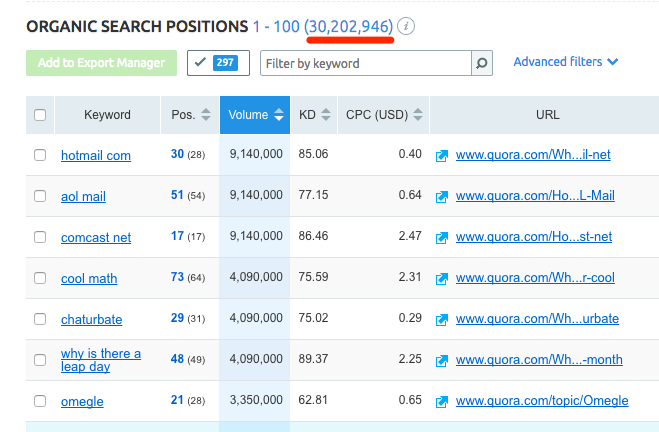
Yep, that’s 30+ million keywords!
BUT...most of these won’t be related to your business at all.
SEMRush also shows threads ranking anywhere in the top 100 by default.
This is no use.
Luckily, SEMRush has a super powerful filter built-in. You can use this to filter for threads related only to certain keywords + ranking in the top 5.
Here’s how:

Hit “Apply”.
The result? A list of threads that that receive a TON of organic traffic and thus, have the potential to send a lot of referral traffic your way.

Pick the 5-10 threads most suited to the article you’re trying to promote, then place thoughtful comments on them with a link back to your new article:

(Yes, all links on Quora are nofollow...but this isn't the aim. Plus, these nofollow links will balance out your link profile nicely!)
#7: Launch the "Skyscraper Roundup" Technique
We’ve all heard of Brian Deans “skyscraper” technique, right?
The one where you find an existing piece of content with a TON of links, make something better (i.e. build a bigger skyscraper), then steal links from the old pieces of content.
Well, the same technique can be applied to roundup posts to generate a ton of traffic and engagement.
Here’s how to do it:
Rather than improving upon other people’s work (as is the case with the original “skyscraper” technique), you improve upon an existing roundup.
Example:
I re-launched my “best SEO tools” roundup.
Initially, there were 97 responses:

Then I added another 46 responses bringing the total up to 143:

This is a great example because new tools are always entering the market.
I, therefore, want to make sure that the leaderboard of best tools within the article is kept up-to-date:

By updating the content I can ALWAYS provides maximum value to my readers, and provide continual blog promotion opportunities.
Here’s the process:
1. Reach out to past contributors and ask if they want to update their response
2. Find new prospects (I usually shoot to add 15-25% minimum new people)
3. Run outreach
4. Update the article (with the new/updated responses)
5. Relaunch with outreach to all contributors
I’ve bolded that last point because it’s the most important.
Reaching out to all contributors (yep, even those that didn’t update their response) allows you to re-promote a “viral” asset and increase social engagement.
This happens because new contributors share it AND past contributors re-share it, leading to a ton of fresh eyeballs on your content.
I mean, that post has been shared ~11,000 times!
Also:
Increased engagement and exposure means passive links will begin to roll in again. This improves the “rank potential” of the article:

Pretty cool, right?!
Editor’s note:
Use “skyscraper” roundups to target and rank for “best” type keywords, such as: “Best SEO tools”, “Best protein powder”,
“Best email marketing client”
This works well because you’re using expert opinion to validate recommendations and help readers cut through the noise. This is particularly powerful when you're just starting out and haven't built trust with a large audience.
Make sure you incorporate a quick shortlist/leaderboard into the post to increase reader engagement!
#8: Use Custom Search Engines to Land Roundup Links
While roundups are a great way to drive social engagement:

And rank for competitive keywords:

...people often overlook the link building potential they offer.
“But Robbie...what’s so special about roundup posts from a link building perspective?”
Simple:
People are much more likely to link out to a piece of content in which they’re featured.
This is because it gives them exposure and helps to reinforce their position as an industry expert.
With that in mind, here’s how to build a TON of links using a link roundup:
1. Grab the names + websites of all roundup contributors
2. Load them into a Google Custom Search Engine (CSE)
3. Search for PERFECT link opportunities across those sites in SECONDS!
OK, so the first step is pretty straightforward...just go through your roundup post and collect the names of all contributors (and their websites).
Being as you’ve already reached out to these people to create your roundup, you probably already have a spreadsheet filled with this information.
Example:
Here’s my spreadsheet packed with contributors from my SEO tools roundup:

Next, copy the list of contributors’ websites and load them all into a Google Custom Search Engine.
IMPORTANT: For whatever reason, Google only allows you to add one website to your custom search engine during the creation/setup stage. BUT, once your CSE is created, you can go back and add the rest of the websites.
You now have a searchable database of contributors websites, which you can use to find PERFECT link building opportunities.
For example, I could search for pages that mention any of the top SEO tools from my leaderboard (e.g. SEMrush):

This kicks back any pages on the contributors sites related to (or that mention) SEMrush.
I can then reach out to these people and say something like:
Hey [NAME],
It’s Robbie from RobbieRichards.com.
Just wanted to thank you again for sharing your favourite SEO tools in my latest roundup—it’s getting a fair few hits, so hopefully it’s sending some decent traffic your way, too
Btw, I just noticed you mention [TOOL] in [LINK TO POST WHERE THEY MENTION THE TOOL]
Any chance you might consider adding the roundup link in there somewhere?
I think it would fit perfectly in [MENTION WHERE YOU WANT THE LINK]
Let me know!
Cheers,
Robbie
Sure, this may look like any other link request, but you have to remember:
- You already have a relationship with this person
- They’re featured in the content you’re asking them to link to (again, this helps to reinforce their position as an industry expert)
- You’re asking for a link in a super-relevant post (this is BIG!)
- You’re telling them EXACTLY where to put the link (this reduces their workload)
Add these things together and you get a link building tactic that works EXTREMELY well...
Here’s one of my recent successes:

Watch the video below to learn a couple more creative ways to use CSEs to land quality links for your website:
#9: Scale Link Roundups
Link roundups might be one of the most overlooked and underrated blog promotion tactics on the planet.
Where else can you find influencers who are actively looking to link to and send targeted traffic to your content?
If you’re not familiar, roundups are simply a curated list of blog posts. Here is a popular internet marketing roundup put together each month by Matt Woodward:

Another good one from Ana Hoffman over at Traffic Generation Cafe:
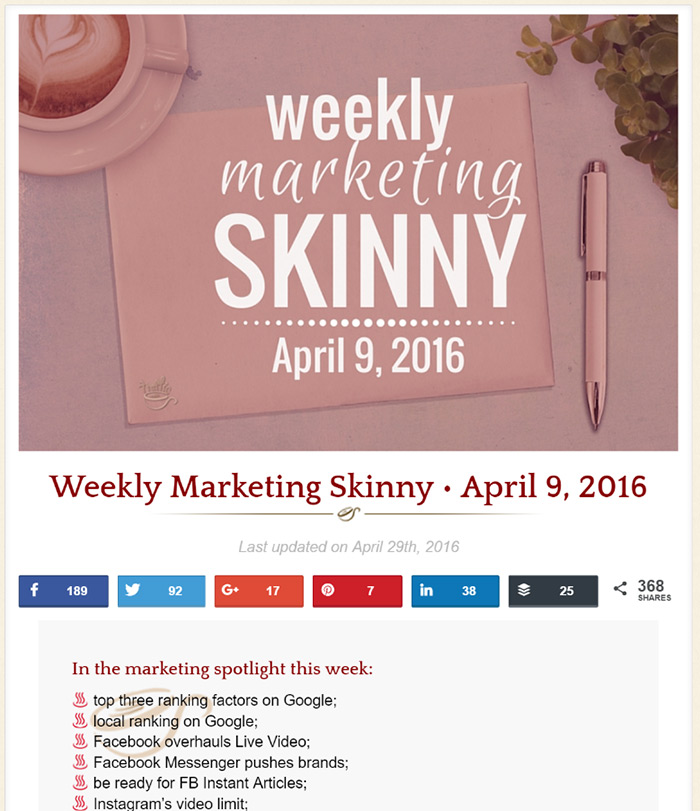
Both roundups have a large following and can send a lot of referral traffic:

The key is finding roundups that have a large readership and get a ton of social engagement.
How to find link roundups:
Start by entering the following search operators into Google:
“link roundup” + your industry
“weekly link roundup” + your industry
~KW + “link roundup”
“KW” + inurl:roundup
“KW” + intitle:roundup
Make sure you set it to filter search results from the past month to find roundups that are consistently publishing new content.
Repeat this process in Google, Bing, Duck Duck Go and Yahoo. You'll find different results 
Next, head over to Twitter and run the same queries in the search bar:

Check out the "Accounts" tab to find all the people promoting roundups in their Twitter profile:
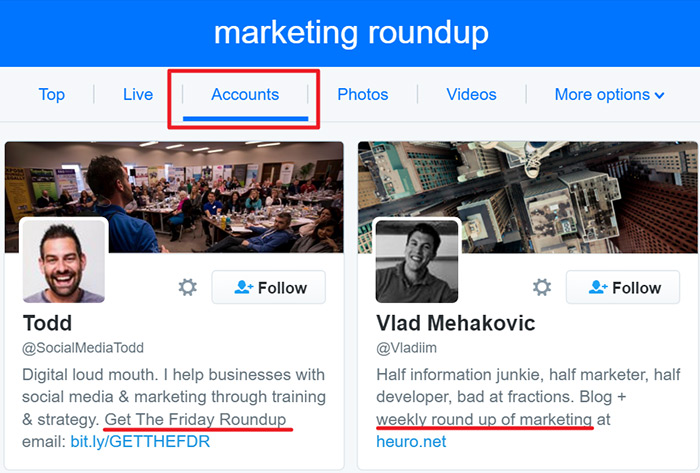
Editor’s note: The search operators shown above will only get you so far. There are link roundups out there with some less obvious names. For example: “Friday Finds”, “Fetching Friday”, “Marketing Skinny”, “What I’m Reading”.
You would never find them using the operators above.
Luckily, the team at Siege Media came up with a workaround.
Basically, you leverage popular content from large publications to uncover hidden link roundups.
How to do it:
First, identify a large website in your industry and enter it into the Ahrefs (affiliate) content explorer and filter the results by "number of referring domains" (awesome, right?!!):

Select an article with a lot of referring domains pointing to it:
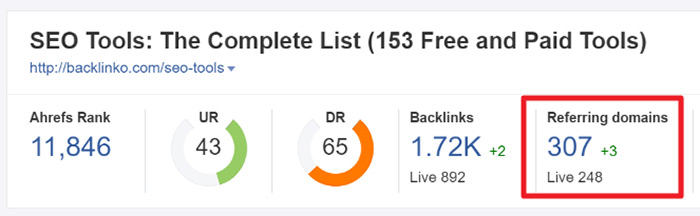
Select the "details" dropdown and select the the "referring domains" tab in Ahrefs to see all the domains linking to the content:
Scroll through the backlinks and you’ll likely come across some new opportunities:

Repeat this process for at least 10 articles, and reach out to the author with a template like this:
Hey NAME,
I was doing some research on TOPIC this morning and came across your weekly link roundup. Nice job!
I'm sure you get a ton of pitches every day, so I'll keep this short. I just published a post that covers 33 tactics I used to generate over 20,100 social media shares with just 15 blog posts. I thought it might be a good fit for your readers.
You can view the post here: INSERT URL
Keep up the good work!
Cheers,
YOUR NAME
#10: Promote to Your Email List
I know..."Duh, Robbie!".
But, you'll be surprised how many people don't do this.
Your email subscribers are your most loyal fans. These people subscribed to your list for a reason...
They actually WANT to hear from you.
As soon as you publish a new piece of content send it to your subscribers. They are more likely to read it, and share it.
I don't care if you only have 10 people on your email list...
Send. The. Email. Now.
Note: Check out this post to learn the single tactic I used to increase email signups 353%.
Editor’s note:
Sending out an email as soon as you hit publish is one way to promote blog content.
But, if the content really kicks ass add it to a relevant segment of your autoresponder so that every single person opting into your email list gets exposed to it.
Make sure you incorporate a quick shortlist/leaderboard into the post to increase reader engagement!

For example, I have an autoresponder series set up in ConvertKit for anyone downloading one of my SEMrush guides/templates:
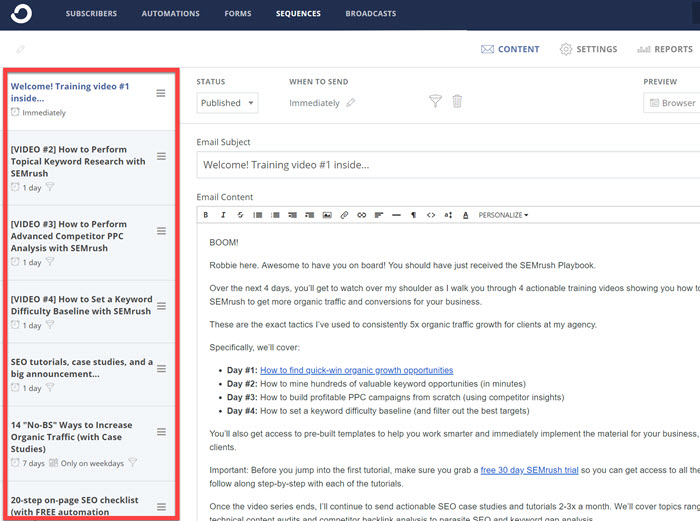
With 10-15 people downloading the resources every day, I have hundreds of people filtering through the autoresponder each month and reading the content.
Each email in the sequence provides users with access to extended free trials of SEMrush, and shows them how to use the tool to get results in their business.
The end result is a passive stream of highly engaged traffic.
#11: Re-Promote to the Non-Openers
What is your average email open rate?
20% ?
40% ?
50% ?
If it falls anywhere around there you might be thinking you have a great email open rate.
The truth is:
50+ % of your email subscribers are NOT opening your emails.
Which means they are not clicking through to your content. Which means they are not reading it. Which means they are not sharing it.
Why would you settle for less than 1 in 2 people opening your emails.
You worked hard to get those subscribers. Don’t waste them.
I’m going to show you a simple email hack you can use to more than double your email open rate and send hundreds, maybe thousands of additional readers to your blog content.
It’s a strategy my friend Noah Kagan over at Sumo calls Double-Opens.
Here’s how to do it:
I emailed out a link building guide to the SEO segment of my email list.
Here’s how the open rate looked:

21.5%.
About average - 69% of the people did NOT open the email.
Sound familiar?!
So, I used the Double-Opens formula to increase my email open and click-through rates by ~50%.
The best part? It only took me 1 minute of work.
Here's how to set it up:
Step 1. Take the SAME email you sent and CHANGE the subject line to something new
Step 2. Email it out exactly one week later ONLY TO YOUR NON-OPENERS
The results speak for themselves:

10.6% more of my list opened the email, which is ~50% more opens than if I did nothing.
1 minute of work = 1,259 more people read my email.
And, an extra 368 people clicked through to my blog.
This simple tweak can INSTANTLY boost your open rates and drive more traffic to your blog.
Before you do anything else, always maximize the traffic from your owned media channels.
Editor’s note:
I use ConvertKit (affiliate) to manage all my email marketing campaigns. Resend a post to only the non-openers with the click
of a button:

#12: Build an Influencer Advocate List
When someone shares your post on social media it tells you two things:
1. The person is interested in the topic
2. The person is likely to be interested in, and share your content again in the future
They are your content advocates; a powerful distribution channel few marketers properly harness.
Here’s how it works:
Instead of going out and finding all the people who have shared similar content to yours in the past, you’re going to identify all the people who have shared your content and reach out to them and ask if you can notify them the next time you publish a quality resource on the same subject.
This blog promotion strategy helps drive a ton of social engagement whenever I publish a new post on the blog:
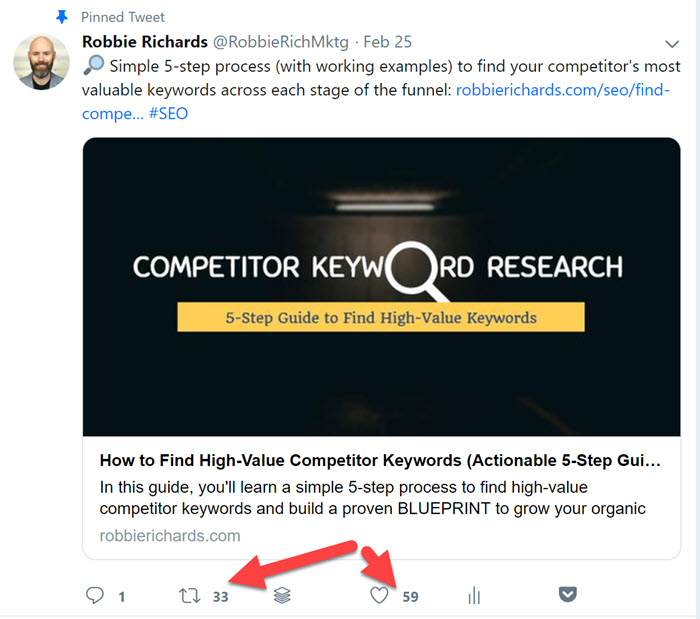
Which leads to thousands of impressions and new visitors to my site. No ad budget required.
First, we’re going to build out a Google Spreadsheet like this one:

You should be able to filter by the core content categories or post types on your blog.
For example, I have it broken out by SEO, content marketing and list building.
Now, I’ll go out and find all the people sharing my content.
Ahrefs Content Explorer
Enter the URL of a post into the search bar:

Since this is a post I have updated, it makes sense that I build a list of all the people who shared the original version. They are likely going to be interested in looking at the new and improved version.
Click “Who Tweeted”:

Next, I’ll filter by follower count to get a list of all the most influential people.
Create an outreach list and add all the most influential people to your list. Once you have completed moving through, export the names and add to the content advocates spreadsheet.
Scraping emails
Identifying the content advocates is only half the battle.
The next step is scraping their email contact information so you can reach out to them when the post goes live.
I use Voilanorbert for this:

This can be super tedious, so I outsource this prospecting task through Upwork.
Once the spreadsheet is full I’ll reach to each person on the list with the following email:
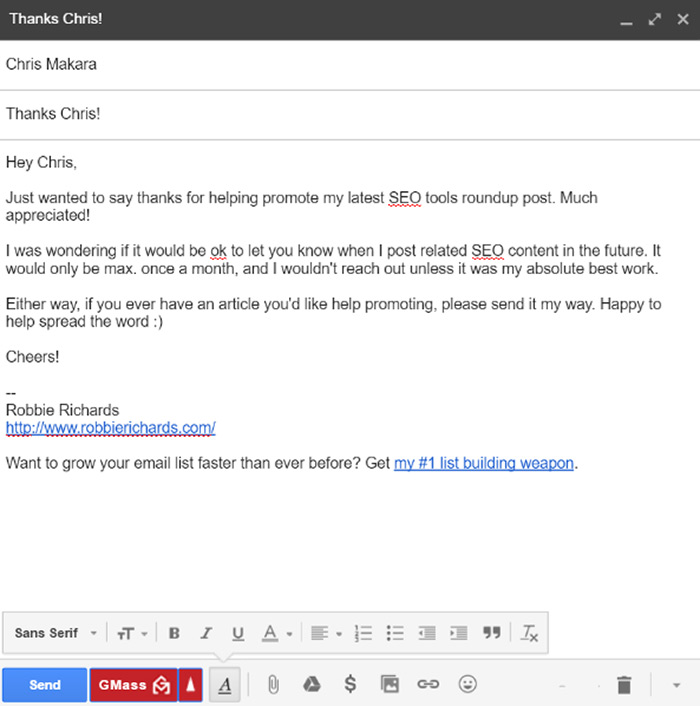
Many influencers will say yes:

This script works well for a few reasons:
1. It’s short and to the point
2. It reminds the reader of how they know me
3. It explains I will only reach out if the content is epic and related to what they already shared
4. It offers return value. I’ll share their content when needed.
Scale this outreach process with a tool like MailShake.
Add each person that says yes to the spreadsheet.
Repeat this process once a week to keep expanding the list.
Soon, you’ll have a large list of influencers willing and ready to share your content as soon as you hit publish.
#13: Rapidly Grow Your Audience With Giveaways

I’m not going to go in-depth on this one here.
I recently wrote a monster 5,000 word case study showing step-by-step how I used the Kingsumo plugin to build and promote a giveaway that achieved the following results:


And get my personal brand in front of massive new audience.
Check it out. It is one of the most effective ways to drive traffic, while capturing and monetizing email subscribers.
#14: Amplify New Content With QuuuPromote
QuuuPromote is a slick tool that helps you quickly amplify content to a targeted audience.
The platform gives you access to a group of industry influencers hungry to share content that you suggest to them. If they like it, they can easily share it from inside the Quuu app.
I’ve used the platform to generate 2,430 shares and 2,459 visits from the SEO and digital marketing communities over the last 90 days:


Total cost: $160.
Setting up QuuuPromote is super easy.
Step #1: Create a QuuuPromote account.
Step #2: Purchase a credit to promote your content ($40/ post).
Step #3: Upload content and select a target audience.
Step #4: Promote.
Once your post has been reviewed and approved influencers will begin sharing it with their audience.
Here’s a quick video that walks you through the entire setup process:
(Source)
#15. Mine Competitors for Traffic Generating Topics
Search volume does not always equal traffic.
When researching keywords, it's important not to obsess over search volume. Instead, focus on finding pages and topics that actually drive traffic.
Here’s how to do it:
Let’s pretend you’re running a blog in the health/nutrition niche.
The first step is to identify a primary organic search competitor. i.e. a site selling the same products/services to your target audience.
For example:
Healthline is a big player in the health/nutrition niche. The site gets over 100M organic search visitors each month:

Heathline organizes its blog content across a set of categories:
- Symptoms
- Nutrition
- Health News
- Etc etc

Paste the competitor domain into SEMrush (affiliate) and navigate to the Top Pages report.
Apply a URL filter to select only those pages in a specific category:

Now you can see the top traffic-generating pages in that category, in descending traffic order:

The top page gets 83.5K organic visitors per month and ranks for 2.7K keywords!
Editor’s note:
Not all sites use content categories like Healthline. Most will house all the informational content under a standard /blog subfolder.
If this is the case, use the same process outlined above, but instead use “/blog” as the URL filter:
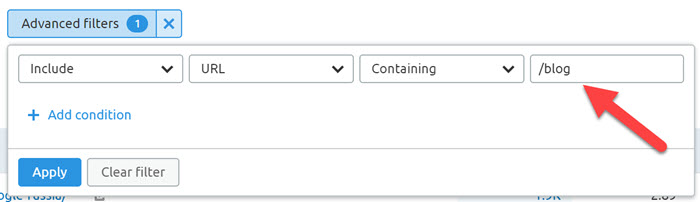
Now I can see a list of all the blog topics that are driving the most organic traffic to the competition. Click on the Keywords link to view all the primary and secondary keywords the article is ranking for:

Run 5-10 of your top search competitors through Top Pages report and add the URL and primary topic to a spreadsheet.
Focus on the traffic over volume.
#16: Buzzsumo-Buzzstream Outreach Hack
The people most likely to share your content are those who have already shared similar content in the past.
BuzzzSumo is an extremely versatile tool I use every single day for content promotion and link building. It allows you to quickly identify the most shared content in your niche…
…including the actual people who shared it.
People most likely to share YOUR content 🙂
Head over to BuzzSumo and enter a keyword related to your topic. Make sure you’re on the “Top Content” tab.

In this case, I’m looking for content related to content promotion strategies that has received a lot of social engagement.
Buffer's post has 3,500 shares to date.
This article providers a powerful outreach opportunity.
BuzzSumo also lets you filter the results by date and content type. I like to filter by “article” as this removes a lot of the promotional junk.
But, one of the best features of the tool is the ability to view “sharers”:

Click the button and you’ll be given a list of all the people who have shared the post on Twitter.
You’ll be able to sort the list by by user type (influencer, blogger, regular folks ...etc), as well as metrics such as domain authority, follower count and reply-ratio:
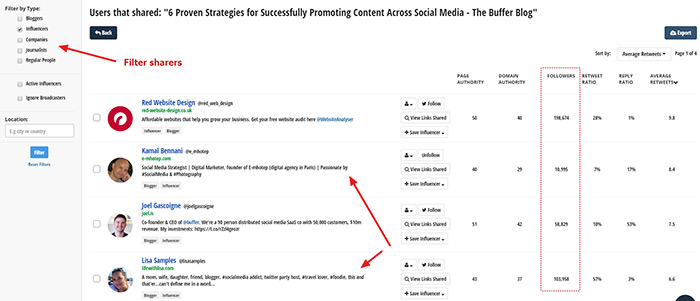
These are the outreach targets.
You can export the list into an excel spreadsheet, filter the results and harvest email addresses using a tool like Scrape Box.
However, I like to use BuzzStream for all my outreach campaigns because it allows me to run a more manual check on outreach prospects and scale more efficiently.
Let’s walk through an example of an outreach campaign I ran recently for my 6,000 word link building tutorial. This post now has over 6,500 social shares –

Generating almost 3,400 pageviews via social referral traffic:

Here is a video that will walk you through my BuzzStream outreach process –
#17: Promote Content in LinkedIn Groups
LinkedIn is one of the most powerful, yet underrated content promotion channels out there.
Similar to Google Plus communities, LinkedIn Groups allow you to promote your content to like-minded people. They want the content you're writing about and are therefore much more likely to engage with it.
Head over to LinkedIn and search for a keyword related to your content or industry.
Select “groups” from the dropdown –

Some of the groups will have hundreds of thousands of members:
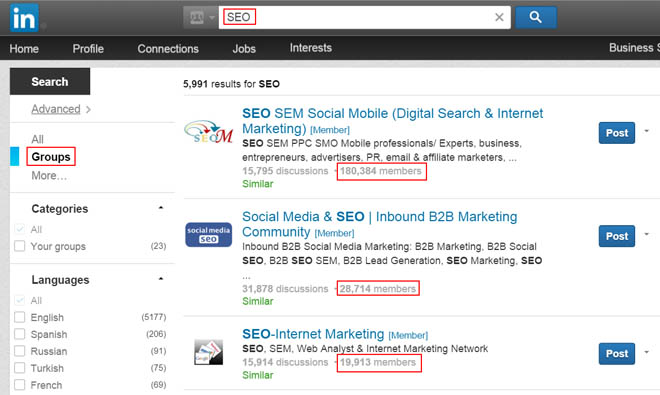
I look at couple different criteria here:
1. How many members (I like groups to have a minimum of 10,000)
2. Are members engaged and do they share valuable content (not just self-promotion)
If the group has 10,000+ active members with plenty of quality content being shared around I’ll join.
Submit your post in relevant groups.
Make sure you engage with other content and members within the community. This is a fantastic way to build connections with industry influencers and build your personal brand.
I’ve generated thousands of social signals.
Engagement.
Connections.
And, 4,326 referral visits from LinkedIn using this simple strategy:

Capturing an extra 95 email subscribers. At just under a 2% conversion rate, it's nothing to write home about, but I'll take it.
Capturing an extra 95 email subscribers. At just under a 2% conversion rate, it's nothing to write home about, but I'll take it.

I've found this strategy to work better in the B2B space.
#18: Use Sniply to Piggyback Off Popular Topics

The tagline captures it perfectly: “Attach a call-to-action to every link you share”.
Sniply is a powerful new tool that allows you to use curated content to drive targeted traffic to your website.
For example:
I might want to use Snip.ly to promote my first post on the blog - my guide to identifying and recovering from Google penalties.
How to do it:
Head over to Google and type in a keyword related to your article.
I’ll use this post as an example:

It's usually good to start with the article ranking #1. This content will likely have a large number of quality links pointing to it:

This is the type of that will resonate with your target audience, making it a perfect candidate for Sniply.
Tip:
Before you start using Sniply, enter primary topic into the Ahrefs Content Explorer (affiliate) and filter the results by “Total Shares”:
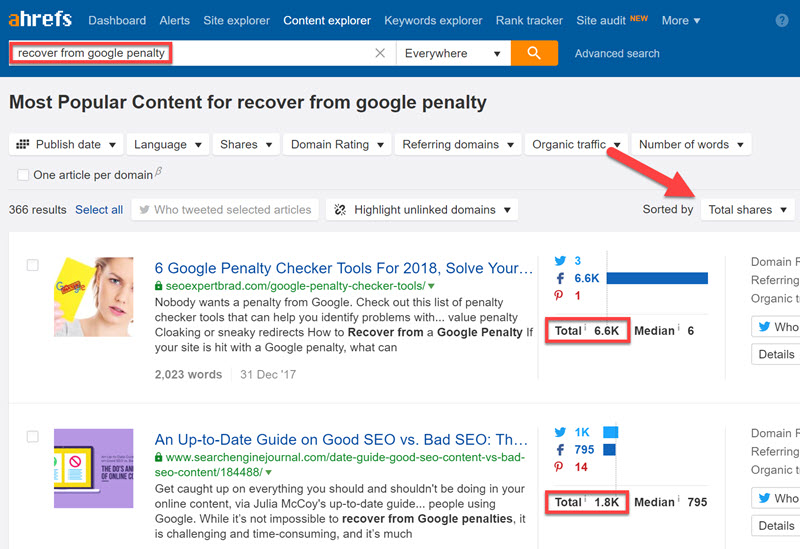
This will return all the most shared content related the keyword you entered, broken down by channel.
Select the article that has received the most engagement on your targeted social media channel.
Copy the URL of the article and paste it into Sniply.

Customize the way you want the snip to appear:

Depending on the account, there will be a number of options available.
For this example we're just going to be using the free version. Select the “button” action type. This will place a CTA button on the source of the curated content that links back to your website.
Add an attention-grabbing message, customize the button text and color. You’re done!
Copy the Sniply URL and start sharing it across your social media channels.

Whenever someone clicks on your sniply link they will be taken to the original curated content, but this time they will see the CTA linking back to your site:
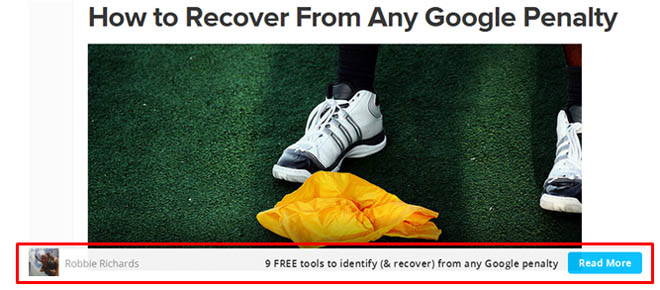
This is an extremely easy and effective way to use curated content to drive traffic back to your site. Anyone interested in clicking a link to read about “recovering from Google penalties” is probably going to be interested in learning about the tools needed to do it.
Editor’s note:
Whenever you’re sharing Sniply URLs, make sure to mention the source of the content and including any relevant or trending hashtags:
If this is the case, use the same process outlined above, but instead use “/blog” as the URL filter:

Also, use a tool like Tweet Jukebox or Buffer to schedule out and recycle a long list of snipped URLs.
This achieves three goals:
1. A nice balance between self-promotional and curated content
2. Engage influencers by mentioning them in shared content
3. Every social media share can be used to drive traffic to your site
Track the performance of your Sniply URLs
Want to know which sniply URLs are driving the most traffic to your website?
A great thing about Snip.ly is its clean and simple analytics reporting. For each snip you have created it shows the number of clicks and the conversions.

111 people clicked this snipped URL, and 54 of those people clicked through to my website!
Not bad for a minute of my time, right?
It gets better.
I decided to run an experiment to see if I could scale this traffic strategy.
I shared a handful of different Sniply URLs across my most active social media channels.
The results speak for themselves - over one thousand visits and 21 new subscribers added to my email list:

Not bad for sharing other people's content 🙂
I plan to scale this strategy a LOT more in the near future.
Note: Sniply keeps adding new features, including the ability to use retargeting pixels and triggered opt-in forms directly on top of curated content.
#19: Promote Your Content in Forums
Forum marketing can be a juggernaut when it comes to content promotion.
Take a look at this referral traffic report in my Google Analytics account:

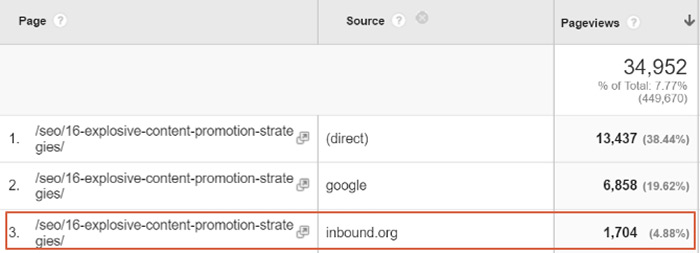
Inbound.org has sent almost 10,000 people to the blog.
My content promotion post got upvoted 124 times:

Generating 1,704 pageviews:
How about this SEO tools roundup?

The more eyeballs you can get on your content, the more social engagement you’re likely to receive.
Inbound makes it really easy for people to share your content from within the forum threads:

How do you find relevant niche forums capable of sending thousands of people to your site?
Keep reading…
Head over to Google and enter the following search strings –
“keyword” + “forum”
“keyword” + “forums”
“keyword” + “powered by vbulletin” (vbulletin is a software used to create and manage forums)
“keyword” + “hot thread with new posts”
“keyword” + “board”
These search strings should give you a bunch of relevant niche forums to investigate.
If you come up empty handed, follow the step-by-step instructions I provide in step #3 of this case study.
#20: Use Parasite SEO to Rank for Competitive Keywords
Don’t worry, I’m not getting all “black hat” on you.
This strategy can be very powerful, especially for newer sites trying to rank for competitive search terms.
How does it work?
Basically, you write a quality guest post for a high authority website targeting a keyword with a lot of search volume.
Add a link back to a target post on your site.
This way, the guest post uses the site's authority (hence the parasite term) to rank for high volume keywords. As the page collects traffic it will funnel some of this through the internal link to your website.
Matthew Barby used this strategy to help Buildfire rank his client for the keyphrase "app makers" (22,000 monthly searches).
The Business News Daily article generated 74,783 referral visits and almost 4,300 user registrations:

I've started rolling out this strategy for some of my clients.
For example:
I used parasite SEO to help a small local property management site rank #1 for the search term "how to become a successful landlord":

I created a basic infographic with Canva and used it as a guestographic post on Landlordology.
The article now drives a steady stream of referral traffic back to my client’s site each month.
If you’re just starting out, it can be very difficult to rank for medium-high competition keywords.
But don’t let this stop you.
Write a guest post and piggy back off the authority of larger sites. If done correctly, you can get articles ranking #1 for large keywords and drive a steady stream of referral traffic to your site each month.
Not to mention, you get an authoritative link that will help boost your site’s domain authority and ranking potential, as well as generate great brand exposure.
Authority by association!
#21. Make Promotion Easier With Jump Links
Evergreen list posts are an extremely popular content type.
And, for good reason - they have social engagement baked into their DNA.
And can be used to rank for competitive search terms:

Just google a few of your top and mid funnel target keywords and you'll probably see several list posts ranking on the first page.
They are a powerful weapon in any content marketing arsenal.
But, there is one BIG mistake I see a lot of websites make.
They fail to leverage all that "social potential" that is baked into it.
Here's what it looks like:
You create a monster list post that is highly optimized for a target keyword. Then, you share it out on facebook, Twitter, LinkedIn and wait for the traffic to come pouring in.
Only to hear crickets.
WTF happened?
You didn't leverage the most overlooked element of your list post.
Jump links.
Only a small fraction of your social media audience will actually see the content you share, and an even smaller fraction will actually engage with it (i.e. share or click through to read the article).
You need to be aggressively re-sharing your list posts. But, I'm not talking about sharing the same post title and URL over and over again.
This is where the jump link strategy comes in. The concept is simple:
Share the same content over and over again, without it looking like you’re sharing the same content over and over again.
Let me explain.
I have several gigantic expanded list posts on my site here and here.
Let’s take the “list building strategies” post as an example.
This is a monster guide covering 25 different tactics I used to grow my email list from zero to 4,476 email subscribers in 10 months with next to zero budget.

Now, I could just continually re-share the same title and feature image over and over again. But, this would get old.
Instead, I leveraged each of the tactics and promoted it as its own blog post.
For example, if I click the “Popup Content Upgrades” link in the list:

It’s scrolls me down the page to the corresponding section:

But, here’s where the magic happens. After clicking the jump link you can see a unique jump link is showing in the search bar:

I’ll promote this section as it’s own unique post:

A couple things to note:
1. Create a different title
2. Include the jump link (not the main URL)
3. Create a unique feature image for each jump link
I use Snappa.io to quickly create professional images for each social media profile:

Repeat this process for each jump link in your list post and schedule each one to go out two days apart.
This way, you could promote the same post for 50 days, without it looking like you're sharing the same content
This will help you increase the reach of your list posts exponentially.
#22: Mention (and Notify) Influencers
Whenever I mention an influencer in a post without them knowing about it in advance, I’ll reach out with the following email:
Hey NAME,
Heads up...
I just published a monster list post featuring the top online marketers to watch in 2015. I featured you in the growth hackers section.
You can view where you are featured here: https://www.robbierichards.com/list/online-marketing-experts-to-watch/#growthhackers
Let me know if you want any info/links added, removed or updated.
Cheers mate!
This is the exact email I used when reaching out to Noah Kagan.
His response:

A man of his word:

There are a few key elements to this type of outreach:
- Keep it short and personal
- Immediately let the person know you have referenced them
- Make it crystal clear what you want them to do
- Provide a naked URL linking to the post
#23: Drive Traffic From Videos With YouTube Cards
YouTube is the second largest search engine on the planet with 4 billion daily views.
People flock to the site every day to find short how-to tutorials.
You can get more mileage out of your content by taking different sections or tips from the article and turning it into a short tutorial video.
For example:
I took my article showing how to do keyword research for an existing website and turned it into a how-to video tutorial:
Use YouTube Cards and description links to drive viewers back to your article for more in-depth information. I wrote about this process in greater detail here.
#24: Use Pins for Added Exposure
A simple way to promote your blog content on Twitter and facebook is to pin it to the top of your news feeds.
Here’s an example of a tweet I currently have pinned to the top of my feed:

Note: This can also work really well for promoting lead gen assets like ebooks, templates, courses etc.
The tweet received 248 engagements, including 63 link clicks:

Here’s how to do it:
Log into Twitter and head over to your twitter feed.
Click the dropdown arrow in the top right corner and select “pin to your profile page”:

You’re done.
Next, pin your content to the top of your facebook page. Simply click the dropdown and select "Pin to Top":

Now, it will be the first thing people see when they land on your facebook page:

#25: Scale What Works
It’s important to understand which types of content are generating the most social shares, visits and conversions on your site.
Why?
Because it is the content resonating most with your target audience.
Publish more of it, and you’ll boost social engagement, traffic, leads and sales.
Here are a few quick ways you can identify what is and isn’t working.
First, open up the Ahrefs Content Explorer, enter your domain and filter the report by “Total shares”:
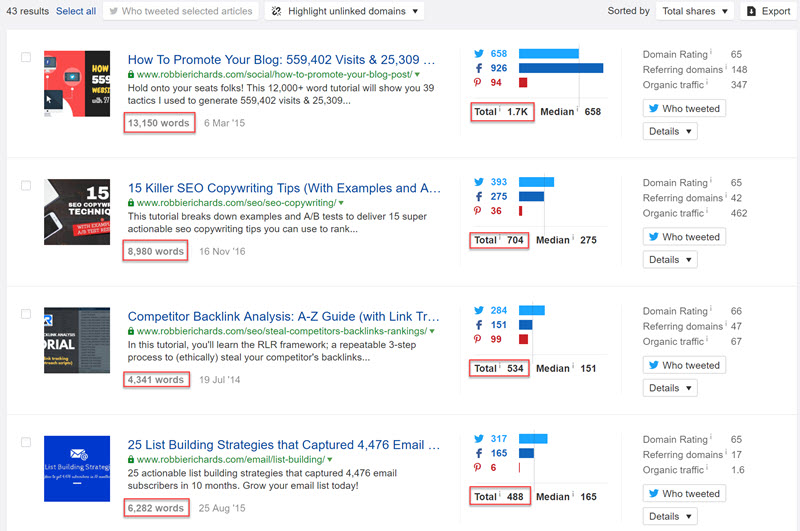
This will show you which blog content people are sharing the most, and across which channels.
For example:
In the Ahrefs report, I can see my readers love long form tutorials/ case studies, and are most active on Twitter and facebook.
Editor’s note: while social share counts can provide a helpful top-level view of which content resonates most with your audience, it doesn’t paint the whole picture.
Once you have an idea which social channels get the most engagement, open up Google Analytics and go the Channels >> Social Network:

After clicking on the facebook network I am able to see behavioral metrics for facebook referral traffic across all blog assets:

Longer on your site = more opportunity for shares and subscriptions
For example:
I can see my SEMrush tutorial had a small number of referral visits from LinkedIn, but MUCH higher average time on page:

I might focus on promoting this across more LinkedIn groups.
Backlinks
Quality backlinks are one of the top search engine rankings factors. They help build domain and page-level authority on your website.
Certain types of content are more "linkable" than others. Finding out which content types and topics are attracting the most links on your site, and that of your competitors, is the first step you should take take before launching a link building campaign.
How to do it:
Head over to Ahrefs, enter your domain into the Site Explorer and navigate to the Best By Links report:

Case studies and list posts have a proven track record when it comes to link acquisition, especially around the SEO topics - link building, traffic generation and tools.
If I wanted to focus more on boosting domain authority, I'd start with those content types and topics.
Note: if you’re starting a brand new site, enter your top competitors into Ahrefs to see which content types/topics are generating the most links for them.
Conversions
Set up Goals in Google Analytics to track which channels are generating the most conversions.
Use the All Traffic >> Channels report to get a top-level view of which channels are converting the best:

Click on the individual channel to see which networks have the highest conversion rates:

Two social channels I don’t focus on a lot are actually converting the best. I should probably shift more attention to these properties in the future.
#26: Mention All Influencers
If you mention influencers or tools in your posts make sure you mention them on social media.
Influencers often have HUGE social audiences that you can tap into.
For example:
Back in 2015 when I had just launched the blog, I published a post titled 80 must-watch online marketing experts of 2015. In order to maximize the social leverage, I divided the post into 10 sections, each with it’s own cover image.
SEO experts:

Conversion optimization experts:

Each section acted as a unique post title, giving me 10 times the promotional leverage.
I mentioned influencers across Twitter, facebook, LinkedIn and Google Plus.
Many of the influencers (some with tens of thousands of followers) shared the post with their followers as soon as the post went live:

This helped the post reach 1,000 social shares in 11 days!

And, was viewed almost 21,000 times in the next 60 days:

As you can see in SEMrush (affiliate), the post ranked highly for dozens of different keywords:
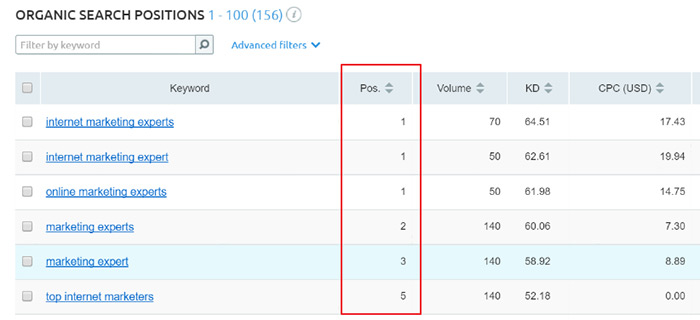
By mentioning influencers across social media I was able to tap into their large networks and drive a ton of traffic to the post. Not bad for a site that was only 6 months old.
I continue to use this strategy every time I publish a new post:

And it consistently drives engagement and traffic to the blog:

Next time you write a piece of content make sure you mention any influencers or tools you reference in the post on social media. You only need one person to take notice.
#27: Add Sectional Share Links
Adding share buttons to your articles is one the easiest ways to boost social engagement across your content.
Almost everyone adds buttons at the top and bottom of the article:

Most will use a free tool like Sumo share to add sticky buttons to the side that scroll with the user as they read down the article.
But, there is one problem. Everyone is doing it now.
Readers are so used to seeing buttons in the same place on every article, they start to become blind to them.
Enter sectional share links.
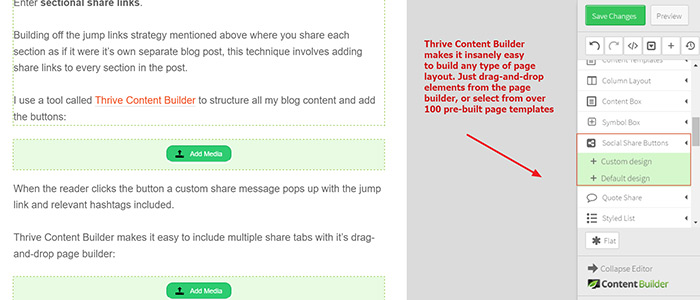
Building off the jump links strategy mentioned above where you share each section as if it were it’s own separate blog post, this technique involves adding share links to every section in the post.
I use a tool called Thrive Content Builder to structure all my blog content and add the buttons:

When the reader clicks the button a custom share message pops up with the jump link and relevant hashtags included.
Thrive Content Builder makes it easy to include multiple share tabs with it’s drag-and-drop page builder:
An alternate method is to create your own button image and use a free tool like the Social Share Link Generator to create a link you can add to the button and trigger the share message.
#28: Top List Posts... AKA Ego Bait
It’s human nature…
People love to be center of the attention.
And, this is why list posts are one of the easiest ways to generate loads of social engagement and traffic from your target audience.
I’ve used them over and over again to build powerful relationships with influencers and produce quick traffic gains for clients across healthcare:

Property management:

Helpdesk IT:

Real Estate:

Some of these posts now rank on the first page of Google for competitive search terms, driving continuous organic traffic.
Here’s how to do it:
First, head over to Buzzsumo and type in a broad keyword related to your industry:

Filter the results by “Influencers” to get a list of the most influential experts in that industry on Twitter.
Repeat the process with several related searh terms.
As you move through the influencers and find solid candidates for your list, click the "Save Influencer" dropdown and add to one of your lists:

You can access your list under the "Outreach Lists" tab:

This feature is a life saver when it comes to organization.
Next, head over to Google and type “top [niche] blogs” to get a list of pre-curated lists of influencers:

Add new ones to your list.
Next, head over to major niche sites and look through the contributors list to find experts writing about topics relevant to your target audience:

Add those folks to your list.
Finally, add any websites/ influencers you follow already.
Once you have a list of at least 40 experts, start building out the list post.
This is formula I like to use
- Name
- Website URL
- Headshot
- Description (why are they awesome?)
- Links to their best content
- Link to Twitter profile

Note: It doesn’t have to be a “top blogs list” every time. You can use “top [niche] experts on [twitter, facebook, google plus]".
These perform really well too:

In fact, Income Diary used top list articles to scale this strategy and grow their blog to 100,000 monthly visitors.

Once the post is live, send out tweets periodically until every influencer has been mentioned on Twitter:

Reach out through email to let them know they have been included in the post using this template:

That simple process is a (near) guaranteed way to generate hundreds (maybe thousands) of social shares, exposing your business to a new audience of potential customers.
#29: Strategic Guest Posting
I know, I know. Guest posts are time intensive.
But, if you approach them correctly, they can have a tremendous influence on your blog.
I’m not going to break down the whole guest post process in this article, there are countless great resources out there, including this one and this one (see what I did there? :)).
However, I will share a couple techniques I use to get qualified traffic from my guest posts.
Qualify with Ahrefs
Writing a quality guest post is very time consuming. You want to make sure you’re time is well spent.
After you find a potential guest post target, drop the domain URL into Ahrefs to get a high-level overview of the site’s organic traffic:
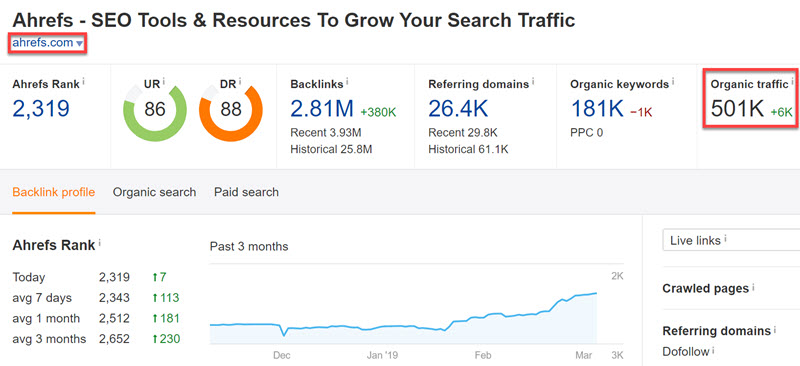
You can take it a step further and see which pages are driving the most organic traffic to the website:

Social engagement
Enter the domain into Ahrefs content explorer and see which content topics/types have a track record of generating a lot of social engagement:
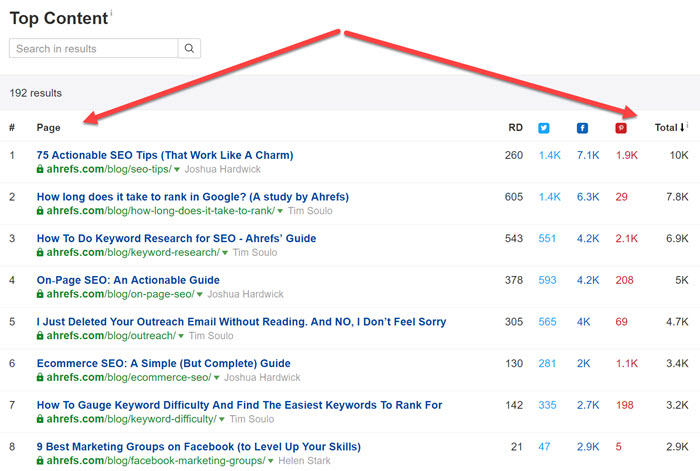
What resonates the most with their audience?
Top linked pages
Navigate to the top linked pages report in Ahrefs and find out which topics attract the most backlinks:
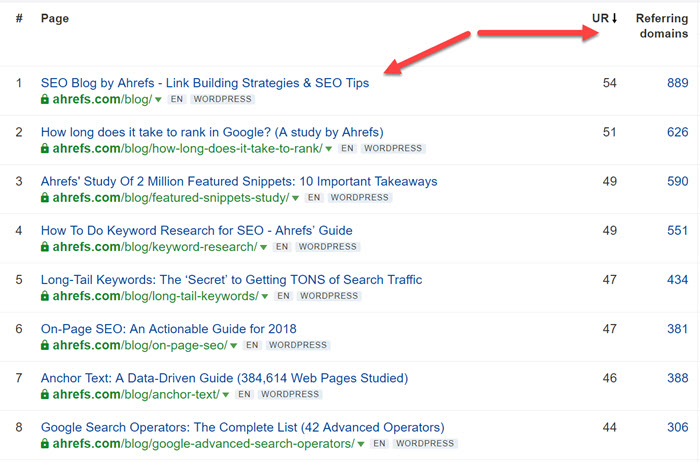
If you're looking to make guest posting a key part of your link building strategy, try to find content ideas with a proven track record of capturing quality links.
Ideally, you want to be targeting site’s with a lot of authority, as well as an engaged audience that will amplify your content.
Once you have found a site that gets a lot of organic traffic and social engagement, pitch your post with a contextual link back to your target blog post.
This part is KEY.
The higher placed the link, the more traffic potential.
For example, I managed to get a link from Digital Marketer in this guest post to my keyword research expert roundup post:

And, this guest post on Sumo:

Combining for 1,352 visits and 143 new email subscribers at a 10.6% conversion rate!

Editor’s note:
Finding and manually vetting sites that publicly offer guest post opportunities can take a lot of time.
One way to scale this strategy it to target sites that don’t advertise the fact that they accept guest posts. Just look for relevant sites and pitch them. Most sites are open to taking guest posts, even if they don’t openly state it.

105,623 results!
The next step is to reduce the list to only include sites that are relevant and can some traffic/ authority to your blog.
Ahrefs provide a series of filters to do this (note: you may have to play around with them depending on the number of results your search returns):

The above filters trimmed the list down to 255 results. These are sites that are topically relevant, have decent authority, and are capable of sending referral traffic back to the blog.
If you want to scale this process, drop 5-10 different topics into the Content Explorer, run the filters, export all the results to a Google Sheet and de-duplicate.
For example, if I was looking for relevant guest post opportunities, I’d search for keywords like:
- SEO;
- link building;
- keyword research;
- Guest posting;
- Organic traffic;
- Etc
Make sure you prioritize the higher DR/traffic sites.
#30: Bake in Engagement with the "ER Framework"
Expert roundups are used a LOT.
And for good reason.
They are the one content format that (almost) guarantees to send a tidal wave of traffic to your website. Not to mention connect you with powerful influencers in your industry.
Trust me, I’m speaking from experience…
This expert roundup generated 2,600 social shares (some data lost with Twitter omitting stats):

Has received 46,326 pageviews:
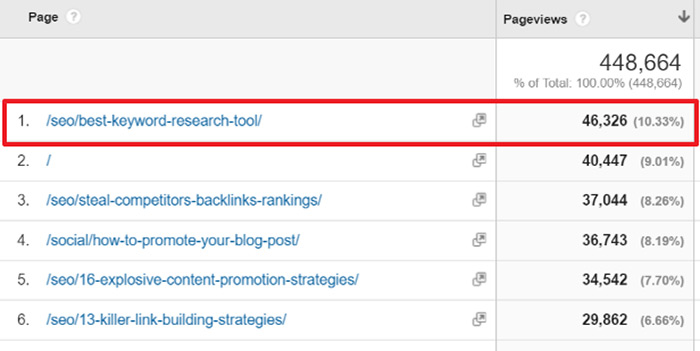
And now ranks #1 for the competitive search term “best keyword research tools”.

It sends over 100 people to my site every single day, and has captured over 2,000 emails.
The beauty of expert roundups is that they are extremely scalable. Once you have a proven process in place, you can implement them time and time again, across practically any industry.
This one generated 1,500 shares in 10 days!

This roundup generated more social engagement for a small property management company, than the previous two years of blog content...combined.

Success with expert roundups boils down to five key elements:
- The right topic
- The right question
- The right experts
- The right outreach
- The right structure
I wrote a monster 5,000+ word tutorial showing I plan, build and promote roundups in this Digital Marketer guest post.
Similar to list posts, the power of expert roundups lies in the outreach. As soon as you hit publish, use a free tool like Gmass to reach out to each influencer on the list and let them know they have been included in the post.
Here is the template I use:

Because each influencer has contributed to the post, many of them will be more than happy to share it with their large audience:

Getting influencers to share your content can quickly trigger an avalanche of social referral traffic.
Recycle the content while mentioning the influencers to maximize social engagement and traffic:

You can use a tool like Buffer’s multi-day scheduler.
#31: Increase Engagement with Twitter Cards
If you’ve ever viewed a YouTube video, clicked on a photo or downloaded an eBook directly within your Twitter feed, you’ve encountered a Twitter card.
They allow you to create a rich media experience far beyond the standard 140 characters.
And, they provide one of the easiest ways to increase social engagement.
How?
More visual real estate = higher CTRs = more traffic.
For example, here’s how my Twitter card carried it’s information right into Brian Dean’s twitter feed when he shared my content promotion case study –

As you can see, this tweet is much more likely to get shared and clicked. It also provides a great mobile experience for your audience.
There are 9 different types of Twitter Cards. I like to use the “Summary Large Image” to leverage visual real estate and maximize social engagement.
Here’s how to set it up:
If you have a WordPress.org website there are 3 different plugins you can use that make adding the Twitter Card markup to your site super easy: Jetpack, JM Twitter Cards and WordPress SEO by Yoast.
I personally use Yoast, so I’ll cover it in this tutorial.
Once you have the Yoast plugin installed and activated on your website, navigate to SEO > Social > Twitter –

Select the Twitter tab, check the “add twitter card meta data” checkbox, enter your Twitter handle (follow me :)) and select “summary w/ large image” from the dropdown –

BAM! You’re done. No developers needed.
You’ll notice that you can also add Open Graph mark up for facebook and Google Plus. I highly recommend you do that too.
No matter which plugin you use, you’ll finish the process by taking a URL from your blog or website (not the main site name; a specific URL where you’d like your card to display) and running it through the Twitter Card validator.
You would get a message like this one –

Click the “Request Approval” button and fill out the form.
Twitter will tell you it can take a few weeks to get approval, but it’s typically an immediate approval.
You’ll get an email like this when it’s approved –

The next time you, or someone else tweets your link, it should look something like this:

And, help attract engagement rates like this:

#32: Promote Content at the Best Times
When it comes to engagement on social media, timing is (almost) everything.
This is especially true on the more popular social media channels such as facebook, Twitter and Google Plus where millions of people are posting and sharing content every day.
In order to get as many eyes on your content as possible, you need to be posting when people are online.
Tweriod
Tweriod is a free tool that tells you when the largest number of your followers are online and engaging with content –
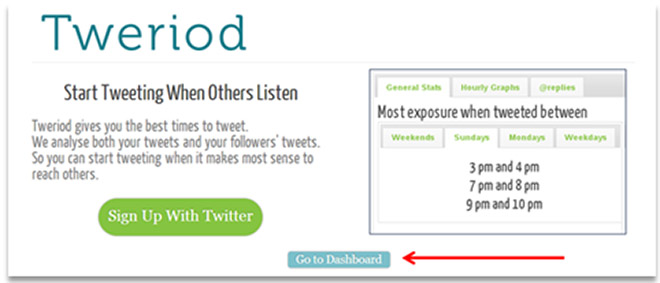
Hit the “go to dashboard” button on the homepage and then sign in with your Twitter account.
Next, click the “my analysis” tab.
Now, you can see at what time, and day, the largest number of your twitter followers are online –

You’ll also be able to view when people are the most engaged.
Look for overlaps between high points of both exposure and engagement. These are the times you’ll want to be buffering your content 🙂
Facebook Insights
Log into your facebook account and click the “insights” tab –

Then, hit the “posts” tab –

Look for which days, and at what times, the largest number of your fans are online:

Now, head over to Buffer and begin scheduling your content when people are online:

#33: Curate Traffic With Scoop.It
Scoop.It is a content curation platform where people collect their favorite content from across the web and publish it in a magazine format similar to Paper.li and Flipboard.
Many of these pages are curated by social media power users and have tens of thousands of active monthly readers looking to digest the exact content you’ve published.
The influencers curating the pages will typically share the content out to their social properties.
Get your content curated on Scoop.It and you could get:
- Quality backlinks
- Targeted traffic
- Social media exposure
Here’s what a Scoop.It page looks like:
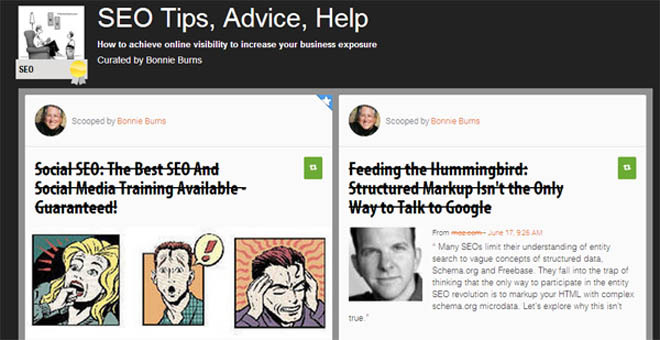
How do you get your content featured on these pages?
Head over to Scoop.It and create a free account.
Enter a keyword related to your content.

or….
Hit the grid button and see if there is a a high level category related to your niche.

Search for Scoop.It pages that curate content similar to what you have written.
Make sure the pages you target have at least 5K monthly views and are regularly updated.
Here is a Scoop.It page with almost 134,000 views.
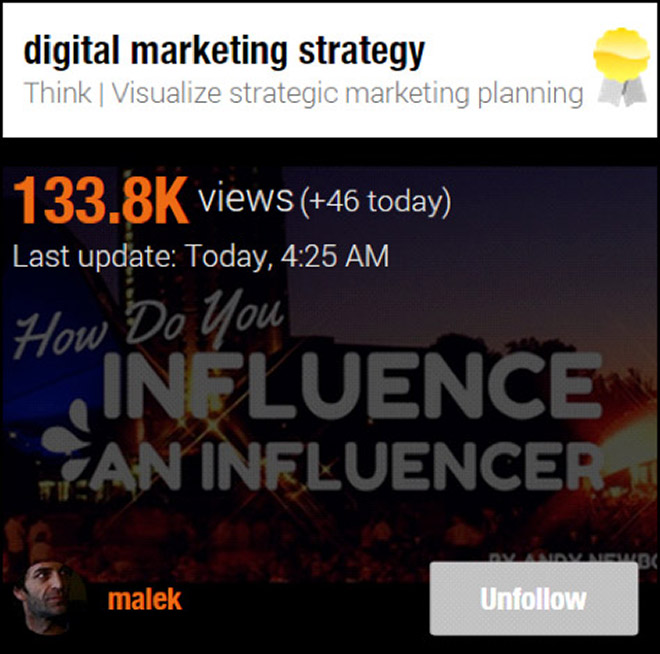
Ideally, you will want to target curators that have a large Twitter following as well.
Why?
Because most “Scoopers” (creative, right?) are also active on Twitter, which opens a whole new opportunity for content amplification.
In fact, readers have the option to share your content to several social channels directly from within the Scoop.It interface.

Follow all the people with popular Scoop.It pages and large Twitter followings.
The next step is to “suggest” your content.
Navigate back over to one of the Scoop.It pages meeting the criteria and hit “suggest”.
Enter your URL and select the appropriate Scoop.It page from the dropdown.

This will notify the owner that you have suggested content for their Scoop.It page. If they like your content, they’ll post it to their page and you’ll have a link referring targeted traffic back to your site.
As an added bonus, many readers of the Scoop.It page will “re-scoop” the content to their pages, and share it on social media.
More social signals. More links. More traffic. Jackpot!
I’ve used Scoop.It to generate some pretty solid social engagement from influential Tweeps. Other Scoop.It users have also re-scooped my content onto their pages –

Helping promote my blog posts and open a nice stream of traffic –

#34: Push Content Hard Across Social Media Channels
Many bloggers suffer from what I like to call “set it – forget it” syndrome – they write a killer post, identify the best times to post, and then only post the content once, right after its published.
HUGE WASTE!
What happens if your fans are offline when you first post? It goes unseen.
Remember, you’ll likely have followers living in different time zones, which means they’ll be online at different times.
So, you need to re-promote your content regularly.
Here’s a rough formula the month after publish:
- Twitter: 3 times/ week
- Facebook: 1-2x a month (depends on total post frequency)
- LinkedIn: 2 times/ month as a status update. Submitted to 5-10 relevant groups.
- Google Plus: Once public profile share. Submit to 8 relevant communities over a one month period.
Now, I’m sure some of you are asking the question….
“Robbie, how do you do this without pissing people off?”
Snippets.
Here’s how to do it:
Don’t use the same title when posting multiple times as this will look spammy.
For example, if I was going to promote this blog post I might try the following –
Tweeting the title:

Pose a question:

Quote an author:

Some other ideas include:
- Citing a statistic
- Mentioning influencers
- Making a bold statement such as “Why your blog traffic sucks and what you can do about it”.
You can also use post segments like I did in this list post.
Every category has it’s own unique header image I can use to promote the post in a different context –

By the time I cycle through the 10 different categories I can start over again without looking too repetitive.
The best part, I can cycle through mentioning 80 different influencers and keep it fresh. With my content scheduling framework, I’ll only mention each influencer once or twice in a post. This means they’ll be more likely to retweet or share the post repeatedly.
Go into your content and pull out at least 20 different snippets using the frameworks above.
Use Buffer or Tweet Jukebox to schedule your content at different times – using the insights you gathered from the "perfect timing" strategy mentioned above.
#35: Use Gated Sharing
As people are reading through your posts make it for them to share directly within the content.
You’ll see in this post, I place a “Tweet This Strategy” button at the end of each section.
If someone likes a particular section of this post they can quickly and easily share it with the click of a button.
The message is already pre-populated for the user –

Similar to how I use the Thrive Leads plugin to capture hundreds of email addresses in-post, you can use a WordPress plugin like Social Locker to promote your blog post –

Use a tool like Print-Friendly PDF to create a PDF of your post and give users access to it in exchange for a tweet.
#36: Cite Additional Resources
As we've seen above, one of the easiest ways to get people to share your content is to either mention them, or their content. We're going to focus on the latter.
Think about all those posts you see with sections called "dig deeper" or "further reading".
Those sections aren't in there just to because the author is a nice person. There is a strategy involved.
It's an easy way to mention influencers in your post, and provide additional value to your readers.
With that said, there are
a couple key points to keep in mind:
1. Choose resources written by influencers
2. Make sure it provides value to the reader
Here are some examples:

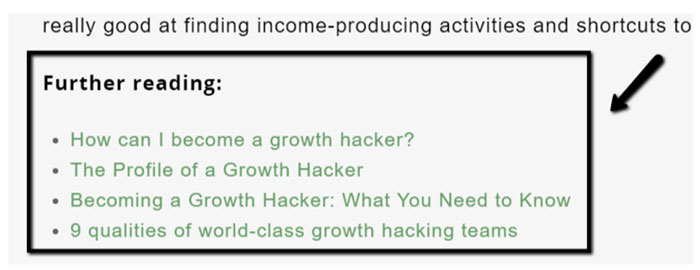
Adding additional resources allows your reader to dive deeper into topics that might not be the core focus of the post.

For example, in this viral marketing case study, Josue knew that the topic of “creating great content” had been written about a million times before, and trying to explain it in the case study would derail people from the main topic of content promotion.
So, instead of deviating from the main focus of the article, he added a helpful list of resources people could read if they wanted to explore the topic of content creation in greater detail.
What you need
to do:
Every time you write a long form piece of content, break it down in chapters, or sub sections. Add an “additional reading” list at the bottom of each section.
Enter the subtopic into the Ahrefs Content Explorer:

Click through to the most shared articles. Articles with largest amount of social engagement resonated with the readers, so you can be fairly confident it’s a solid piece of content.
Make a note of the influencer who wrote the article.
Next, head over to Google and enter the search term.
Take note of highest ranking content. These pieces have likely been linked to a lot in order to rank for such a competitive search term. This is another indicator of popularity.
Reach out
The final step in this blog promotion tactic is to reach out to the authors of the articles mentioned in your content.
Tip: Reach out to the authors before you publish the post to seed interest.
You can borrow Josue's script shown below:
Subject: NAME, I featured your work
Hello NAME, I know you're busy so I'll keep this short.
We are mentioning [brand] in a coming blog post and I thought you might want to know. It's a pretty epic guide about [your topic].
Let me know if you want a heads up once the blog post goes live 🙂
Cheers!
Your
Name
#37. Get Sumo-Sized Share Counts
One of the easiest ways to drive more people to your blog content is to increase the amount social engagement each post receives.
The easiest way to do this?
Make it dead simple to share your content at all times, on any device.
Meet the Sumo Share App.
This free app makes it incredibly easy for people to share your content across every social media channel.
You can create floating social share icons that scroll with the visitor as they read down the page, giving them the option to share your content at all times. The Share app is responsive, providing a great user experience across every device.
Since installing Sumo Share on this blog, the amount of social engagement has skyrocketed. This post and this post combined for over 14,400 social shares:

This helped drive 8,272 social media referral visits to the posts:


Adding hundreds of subscribers to my email list.
Easy sharing = passive traffic = opt-in exposure = more email subscribers.
Some other cool features of the app include –
- Control the page and position social icons display
- Integrates with 16 different social channels
- Smart sorting to maximize which networks drive the most social traffic
- You can see which posts and social channels are getting the most engagement

Setting up Share
Head over to the Sumo website. If you have a WordPress website simply download the plugin zip file.
If you use another CMS, copy the HTML code and add it to the <head> section of your website. They’ll walk you through the entire setup process.

Next, head back over to the plugins section of your WordPress website and upload the Sumo zip file.
Activate the plugin.
Now, when you visit your website you’ll see the Sumo crown displaying to the side of the screen. Click the icon and register your Sumo account.
Next, enter the Sumo store:

You’ll see all the different apps you can install on the site. Click the “Share” icon.
Once you have the Share app installed, navigate over to the “Layout” tab and select the areas you want to show your share icons:

Pro Tip: In the settings tab set the browser width to 1440 pixels. This will make the social share icons display along the bottom of the screen when visiting a site on a laptop device (example):
Next, select the different social accounts you want to feature on your Share bar:

To keep it clean, I include a maximum six channels - those I’m actively engaged on.
I also enabled Smart Mode so the most popular social networks (based on share count) are always placed at the top:

High visible share count = more social proof = more people will share it.
Finally, in the “Services” tab be sure to set your Twitter handle (do not include the ‘@’ symbol).

This will append your Twitter handle to the end of all the tweets generated by your Share bar:

#38: Let Readers Click-to-Share (with the Sumo Highlighter)
Highlighter is another great free app from the team at SumoMe.
It is designed to encourage sharing on Twitter and facebook by letting readers easily select portions of your blog post to share as quotes on Twitter or facebook.
It’s an automatic click-to-share.
Log into the SumoMe app store and install the Highlighter app –

Important: In the settings make sure you enter your twitter handle. Highlighter will append it to the end of the lines of text people are sharing on Twitter. This will help build your follower count.
Now, whenever someone highlights a piece of text in your content they will see a popup that looks something like this –

People will also be able to share highlighted text on facebook.
Make sure you append your handle as a suffix to the Tweets –

This will help grow your Twitter following too.
Easy sharing = more sharing!
#39: Turn Every Image into a “Shareable” Asset
If you include a lot of quality images in your posts, install the Image Sharer plugin from Sumo.
It will add social share icons over all the images in your post. As people hover over the images they’ll see something like this:

You can configure which icons display.
Understandably, this app tends to work really well for Pinterest.
#40. Steal Traffic With Strategic Blog Commenting
Let me set this straight:
When I recommend commenting as a blog promotion strategy, I’m not talking about spam:

This is a HUGE waste of time.
Instead, we’re going to use blog commenting to accomplish the following objectives:
#1: Create a more natural looking link profile
#2: Reach a targeted audience
#3: Drive a passive stream of referral traffic that actually converts
#4: Connect with industry influencers that can amplify your brand
The process: Find high-traffic blog posts, and leave value-add comments that send readers to your newest content.
Twoodoo used this low-cost strategy to grow their user base:

After two weeks of implementing a strategic blog comment strategy Twoodoo saw the following results:
Blog comments: 40
Referral visitors: 452
Sign ups: 72 (16% conversion rate!)
Time invested: 6.5hrs
ROI: 11 sign ups/ hour spent
Here’s how to do it:
Open the Ahrefs Content Explorer (affiliate) and search for a topic closely related to your newly published blog post.
Next - filter out pages that receive a lot of organic traffic:

Note: your traffic threshold will depend on the topic. For example, if you’re searching for a topic like “content marketing”, restricting the results to posts that have a minimum of 1,500 monthly organic visitors will still return 477 results:


With the traffic and language filters set, restrict the results to only show "one page per domain".
Next - get a VA to scan through the list and select any relevant blog articles and flag the articles that:
(1) have active comment threads;
(2) allow links in the comments
Put together a value-add comment, and insert a link back to your new blog post. Check the referral traffic report in Google Analytics to see how much traffic (and conversions) each comment is sending to your blog.
#41: Use Website Custom Audiences to Re-Engage Readers
This post is centered on free ways to promote your blog content, however I wanted to add a bonus tactic you can use to accelerate traffic with a small budget.
Facebook WCAs
There are countless ways you can use facebook custom audiences to drive targeted traffic to your website. If you want to take a deep dive, check out this post by Jon Loomer.
Here are two low cost ways you can leverage facebook ads to seed your content with an influx of engaged readers.
Target facebook ads at your website visitors
This one is pretty self-explanatory. First, you’ll create a retargeting audience that contains everyone who has visited your website within a specified time period.
These people have already been to your site, know who you are, and will be much more likely to engage with and read your content.
Here’s how to set up your first facebook retargeting audience:
Add the retargeting pixel.
Within Ads Manager, select “Audiences” within the Tools drop-down at the top:

Grab the pixel and paste it between the <head> tags on your website.
Create the rules for the audience
Once the retargeting pixel has been added to your site, click the “Create Audience” and select “Custom Audience” from the drop down.
Choose “Website Traffic” from the options:

Select “Anyone Who Visits Your Website” and set the duration to 180 days:

That’s it.
Your audience will begin to collect users and you’ll be able to select the custom audience within the targeting section next time you set up a facebook ad promotion.
Note: If you want to get a little more granular, create custom audiences that contain visitors who viewed specific posts and categories on your site:

Or, create retargeting audiences that include viewers of specific content that DID NOT opt in to your offer:

These audiences are great for lead generation retargeting.
Which leads me to the next audience...
Target ads at your email list
People receive about 147 emails a day.
So, chances are pretty good they will miss your emails from time to time.
Luckily, there is a way to re-engage your email subscribers outside the inbox.
Upload your email subscribers into facebook and they will go out and map each email against the profile logins.
I see about a 50/50 match rate in most cases.
Here’s how to do it:
Navigate back over to the facebook ads manager, click “create list” and select the “customer file” option:
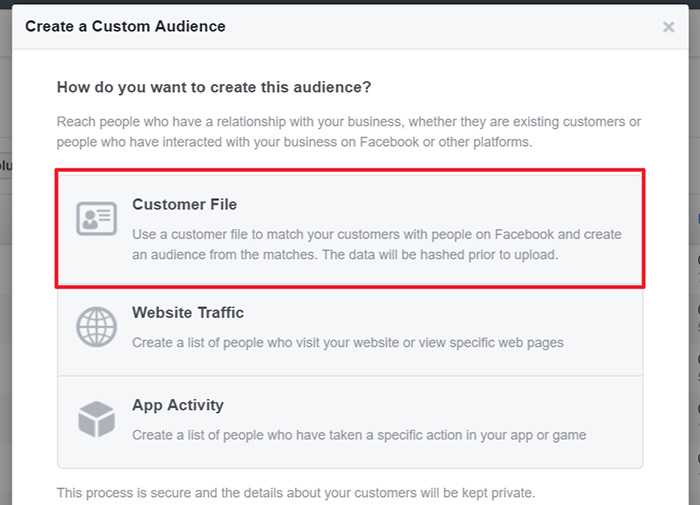
Upload a .csv of your email subscribers.
If any of the emails have a facebook login attached to them they will be added to the list, and you’ll be able to display ads directly in their facebook feeds.
This is not only a great way to engage your email subscribers outside the inbox, it also allows you to convert them into facebook fans, building out another powerful content distribution channel.
Note: You will need to continually upload updated email lists to add new subscribers.
Scale reach with lookalike
audiences
If you have a new blog or website with little traffic, it will take a while to build out large facebook retargeting audience.
Luckily, there is an easy way around this.
Lookalike audiences.
This feature allows advertisers to build “similar” audiences off of existing audiences in their ad account.
You can ask facebook to find the top 1% (optimize for similarity) or 5% (optimize for greater reach) based on the audience interests.
You can build a Lookalike audience of similar users based on all the people who viewed your post about dog training.
Here is another post from Jon Loomer that gets further into the weeds.
Basically, this feature allows advertisers with little audiences to reach a MUCH larger relevant audience on facebook.
Here’s how to set it up:
Go to the Ads Manager and select “create audience”. Choose “Lookalike”:
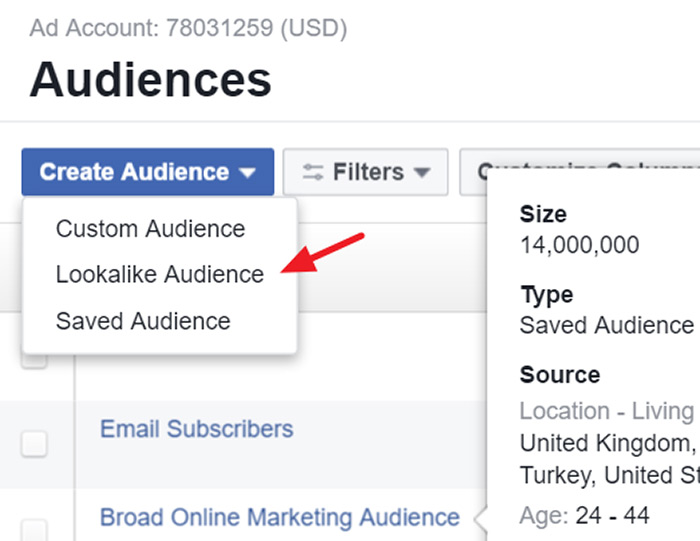
From the source tab you have the option to build the Lookalike audience off a page you control, an existing custom audience or conversion pixel:

Once you have set the source, choose the level of “similarity” and click create audience:
This audience will be available in the targeting section next time you launch an ad campaign.
Ready, Set, Promote
With a clear strategy, free tools and some hard work you can promote your blog posts to get thousands of social shares every time you hit publish.
As your social share count increases you open your site up to hundreds, maybe thousands of new readers, subscribers, and potential customers.
Best part of all, once you’ve optimized a site for social sharing using the tactics and tools listed above, you’ll start to receive a steady stream of passive referral traffic.
1. Share this post if you liked it :
3. Leave a comment below and let me know which tools or channels you’re using to boost social engagement and promote your blog posts.
Would love to connect AND hear your thoughts 🙂
Note: Next month I'll be re-opening my premium training program, The SEO Playbook. Learn more about the course and see what current students are saying here.
Holy F*ck…This is some next-level content Robbie.
Any chance you know how much time you spend creating vs. promoting?
I’ll have to give this guide a try step-by-step soon 🙂
Cheers Dale! I spend about 60/40 in favor of content promotion. Should be 80/20 🙂
Let me know how you go!
Will do – might be a little bit, but I’m excited 🙂
Sweet, look forward to hearing your results 😉
Robbie,I want to know how much time does it take to complete this post?
Do you outsource anything or did all the things your self.
I also used the same theme and same content builder which you use.
Cheers Nekraj
Nekraj,
35 hours probably 🙂
To be completely honest, with a bounce rate of 80%, these strategies could use a lot of fine-tuning. That means that 80% of the audience you got was not all that interested. Next you need to work on lowering that closer to a 40-50% level.
Hey Adrij,
Completely agree, 80% is a high bounce rate. But, when it comes to blog content isn’t all that out of the ordinary. Often times people see a link to a topic they’re interested in, read it and leave. They got what they wanted. Same if they access it through search results. Looking for a specific information based topic…consume the information and leave. I would like to see it lowered. Totally agree there. I also like to look at the time on site and repeat visitor metric. A lot of the time my content is super long. People skim and return to read later. Hence, I have 45% return visits and direct traffic as my #1 source. So, I know people are coming back to digest. I need to experiment with shorter, more targeted topics and include more video to keep them around longer too. Thanks for the input. You make a solid point!
Robbie, I would be interested to know what your bounce rate for this particular post is. I can’t imagine this post having an 80% bounce rate!
I myself have a somewhat unorthodox strategy, as I am quite picky where my traffic comes from. My bounce rate is always under 15% and my homepage currently converts (email opt in) at 62%. I know that sounds crazy, but I would be happy to share my analytics with you if you wish and respectively share some suggestions to get that bounce rate down!
Cheers Dan! Those statistics are insane. 62% with a sub 15% bounce rate! Nice work. Would love to hear your suggestions…
this is epic! Thanks for sharing Robbie.
Cheers Patrick!
Thank you – really great ideas. Finally got the idea how to set up Twitter cards! Thank you for sharing!
Aure,
Glad to hear you found the article helpful. Twitter cards are HUGE for increasing CTR.
Agreed, didn’t realize why my Twitter card was getting declined; had no idea you couldn’t submit a homepage.
Hey Sandra,
Do you have the Twitter cards in action now?
I don’t yet. I have approximately 814 things on my developers’ queue (including getting our damn blog live!), so we’ll get to it. Appreciate the info though! Will come back to it when we’re ready to get our og set up.
Great post, tons of useful tips here! Thanks Robbie!
Cheers Anand. Which ones are you going to implement first?
Great round up of tactics for promoting blog posts here. One thing that I quickly noticed is that the article title suggests you don’t have to spend a penny, although the software (i.e BuzzBundle) does in fact cost money to purchase.
Good job with this piece 🙂
– Stuart
Cheers Stuart!
Yes, Buzzbundle does come with a price tag. However, they do have a free option. You only get access to 30% of the online conversations, but its still helpful. I used the free for quite a while before deciding to upgrade to scale. Appreciate the feedback.
What a post Robbie! Thanks for all the tips.
I’m already a big fan of SumoMe and will definitely check out BuzzStream after watching your workflow.
May I ask you how long it took you to create this post from A to Z?
Thanks Stephen! Buzzstream and Buzzsumo are weapons for both content promotion and link building. It took me about 30 hours or so. I broke that up over the course of a month though 🙂 Lot of work!
Lots of work indeed but it shows!
I appreciate all your effort!
No worries! The positive feedback and emails make it all worth it. I’ve got something pretty awesome launching in the next couple weeks. Keep an eye out for that one 😉
This is so amazing. One of the best guides I ever read and one of the few that I actually finished in one sitting. I will have to try this step by step for my next blog post.
Thanks Angelina! Let me know how you fair 🙂
Awesome post Robbie!
Loads of value here.
Cheers Andy! Any favorites in there?
Robbie, this is amazing stuff, finally I have a simple, but extensive guide to promotion… Especially considering the low/no budget element and targeted outreach. Thanks a lot for sharing it with the world!
Cheers Akos! You might want to check this case study out too: https://www.robbierichards.com/seo/case-study-triple-traffic-in-30-days/ 😉
Hey Robbie,
Well done. Really well researched and really useful. Great bunch of tools. Been looking for a tool to manage multiple social accounts, couldn’t find one…Buzz Bundle looks like just the one, thanks for the referral.
Cheers,
William
Hey William,
I really like using Buzzbundle to scale my social media outreach. I like how I can reach out across FB, TW, G+, forums, blogs, Q&A from a single interface. I believe the free version let’s you see 30% of the conversations. Kind of limiting on the blog/ Q&A piece, but would recommend using the free trial before upgrading to make sure it meets all your needs 🙂 Let me know how you go with the tool? Cheers, Robbie.
Canned responses. How did I not know about this?
Robbie mate you’ve changed my life.
Hahaha they’re pretty helpful for small scale outreach campaigns. I did that a lot before moving over to Buzzstream. Glad the article was helpful 😉
Hey Robbie,
This is some great content. Just started my own blog and I was looking for ways to promote my content. This really helped. Thanks!
Awesome, thanks Davina! I’ll be launching a content marketing course end of April. Keep an eye out for that one 🙂
Hi there ,
You absolutely crushed it with this post, Robbie 🙂 That’s too much of heat in one post. Worth every minute !
I was seriously on the look for finding new ways to get my content promoted and you gave me more than enough. This changed the way I look at content and promotion.
Thanks, mate ! It’s time for the little baby to get working 😉
Cheers !
Awesome! Let me know how the tips go Sourav 😉
Agreed, this is some next level stuff, love how in goes so much further than just telling us the tools.
We will definitely be implementing some of these!
Cheers Quincy! Keep an eye out for a content marketing course I’m launching beginning of next month. It’s going to make that post look like child’s play 😉
Robbie,
Where are you getting the emails from when you use Buzzstream or any of the outreach?
Hey Quincy,
I primarily use the BuzzStream chrome extension to scrape contact information from within Ahrefs and Buzzsumo. Would you like me to write up a tutorial? I was thinking about doing it anyways…Just need to launch my product first 🙂
Hey Robbie,
I just wanna say thanks.
Social media is something that I need to get into. So thanks man.
Cheers.
Cheers Julian! Let me know if you have any questions.
Hey Robbie,
Thanks so much for this post. I think your bounce rate is going to decrease because this post is going to stay open for all eternity in my pinned tabs haha.
Seriously, will be returning to this whenever doing blog work. Thanks!
Connor
Cheers Connor! Stoked to hear you’re enjoying the post. I put a lot of hours into these posts, so it means a lot to get the positive feedback 😉
No problem! It definitely shows!
In your opinion, what can you do to put your blog posts far above the rest when writing long form content? It obviously needs to be readable, informative and in-depth… Specifically though I’m interested, some things I’ve been integrating:
– Relevant pictures
– Statistics
– Links to other resources (when only touching slightly on topics)
– Mini tutorials for steps in how-to tutorials
By mini-tutorials I simply mean when there are several steps in a process and you create in-depth descriptions for each step rather than listing them with bullets or something…
If there’s anything else I could be doing I’d love to know. Thanks again!
Connor,
Write case studies 🙂 They resonate WAY more with your audience because you are backing your claims with data. Check out my content promo case study. It has over 5,500 social shares and still brings a nice stream of organic traffic to my site to this day.
If it’s actionable and backed by data you’ll do well. All other things equal.
Robbie, you nailed the topic to the wall and am speechless. Just launched a new Blog and am still struggling to get it out. This surely will add some bite to my effort at promoting my Blog. Thanks so much Robbie. I will be more than glad to have you as a mentor.
Cheers Clement! Let me know how it goes.
I just wanted to let you know that when i click on number 16. email list the browser doesn’t get me to that particular paragraph.
ps: Awesome blog post!
Thanks for the heads up Vincent! I’ll check it out.
OMG…Robbie…In One Word —> You Killed It…!!!
You showed in a freaky big Article which is super detailed BTW, the Difference between a Guru and a Normal Blogger. Gurus know this and New Bloggers don’t know.
Gonna Try your Methods One by One
I don’t have Words to say. Thanks a lot 🙂
I just wanted to promote my blog post and was searching for it on Google.
But Never Even in my Dreams thought that I will end up in an Article like this one.
Thanks Again…Long Live Robbie.
Cheers Felix! Stoked to hear it blew your mind. That’s what it’s all about 😉
Amazing piece. 🙂 Came here via growth hackers. Keep up the good work. Cheers.
Cheers mate! Appreciate you stopping by 😉
Hi Robbie
Thanks for this detailed post. All of them are very precious.
Let me ask, why sould i use Sumo, instead of some other native WP plugins like Digg Digg. What are the benefits of Sumo. (should i pay for it?)
By the way, I want to follow your post from RSS but Inoreader cant find any Rss at your blog.
Hey Mumin,
Sumome provides analytics, placement control, customizations for different screen resolutions, the icons look nicer….I just like it 🙂 The free version is plenty.
Here is the feed: https://www.robbierichards.com/feed/
Cheers!
Couldn’t stop from bookmarking this page. 🙂
Hello!! I am trying to use the buzzsumo to reach out to people who have shared things similar to me, but i don’t know how. I cannot use the buzz website that you used because it costs money. How do you obtain those peoples emails?? I have the list on buzz sumo but i don’t know where to go next. thx!
Hey Madeline,
I use the BuzzStream chrome extension to create prospecting lists from directly within Buzzsumo. There should be a video in the post that shows you how I did it 🙂 Let me know if you have any other questions.
Awesome article !! learned a lot. Just a quick question, which tool you are using for monitoring traffic (the fist pic on this blog)?
Regards.
Thanks Himanshu!
It’s a screenshot from Google Analytics.
ooh, kinda feel dumb right now 😀
Why?
That was pretty basic, but hey I am just getting started 😀
Himanshu, social content promotion doesn’t have to be rocket science. With a little leg work, even the most basic strategies can have big results. Anything else you’d add to the list?
Hey Robbie! Excellent post. Thanks so much!
I got one question. I tried the #2: BuzzSumo/ BuzzStream Outreach technique and I followed your video instructions but when I start prospecting and looking at the websites, I can’t find any emails to fill into the forms and I get stuck…How do you find their email addresses?
Can I just tweet them through twitter and ask to share my post?
Thanks! 🙂
Hey Ville,
Sometimes the Buzzmarker chrome extension won’t find contact details. In which you’ll need to do a little manual digging. Often, the contact or about page will them. Contentmarket.io is another great tool for scraping contact info. Otherwise, just submit through their contact form. Twitter outreach is definitely an option too, check out SocialRank. Great tool for this!
Also noticed that the #2 technique doesn’t really work in the fitness industry :S
Hi Robbie,
This is blog is amazing, such a wealth of information and one of the best blogs I have read on promoting blogs and SMO.
Every tool you shared are wonderful and this is the first time I am hearing about some of these wonderful tools.
I have bookmarked the blog, and will keep coming back to gain more insights.
Keep it up
Cheers
Awesome, Leena! Glad you’re enjoying the content and finding it helpful. Love to hear it!
If you haven’t done so already, hop on my email list, I share exclusive tips and tutorials there.
Thanks for the awesome article, just one more question.
can you point me to one place detailed guide for Promoting and Making money blogging? .,
Check out Gael Breton’s blog – Authority Hacker.
This is just amazing post with so much learning tips and tricks. I like the Image sharer techniques.. Really creative post that contains some useful advice. I will going to implement these.
Thank You
Best Regards,
Saqib Ahmad
Great, thanks Saqib! Let me know how it goes.
Hey Robbie,
Worthful to read your each and every post. So much researched and deep indepth in your post mate!! Just want to confirm that all tools you have mentioned in your post is absolutely free or paid??
Thanks for sharing great insight 🙂
Awesome, Anant! Glad you’re enjoying the content.
Most of the tools are free, but there are a couple paid ones. For example, BuzzStream is a paid tool.
Thanks , really helpful,
we are implementing this on our blogs…
Let me know how you go 🙂
Nice articles with full of information for new bloggers on the internet..
Thanks for this long and detailed list of tricks for promoting website. I am going to apply this on my newly created blog.
Thanks Siddharth! Let me know how you go.
Awesome resource you have put together! It must have taken you a few days.
I have bookmarked it and it is what I am using to promote my blog posts. Many people have written about how to write great posts but few have written about how to get those posts read.
Thank you for filling the void.
Cheers Martin! This post took me about 30 hours to put together 🙂 Glad you liked it!
Hi!
I’ve just read your article and now I’m going to read your case study: Case Study: How I Increased Traffic 272% In 30 Days.
Congratulations, your posts are awesome.
Cheers Leonardo! Let me know how you go with it all. Happy to answer any questions 😉
Thanks for the great post, the detail is brilliant.
The tips on how to use BuzzSumo more effectively is brilliant, I’d been wondering how to really take advantage of it for a while.
Do you find topsy useful?
Glad you got value from the post, Kameel! I use Buzzsumo every single day for a bunch of content marketing and link building tasks. Huge time saver. I use topsy every now and again, nowhere near as much as Buzzsumo.
Impressive list, this is great info for newbies like me. Thanks for that!
My pleasure, Derek!
I love this article! I really want to try these techniques that you suggest but it’s hard for me to figure out what to write about.
Hey Brenda,
This article might help you out: https://www.robbierichards.com/seo/case-study-triple-traffic-in-30-days/
this one is very very useful! thank you for writing!
Cheers Sandro! What’s your favorite strategy?
After spending countless hours researching promoting blog articles , this by far is the most extensive insightful and helpful one i have come across ! great advice and motivates me more to start my blog with confidence
Hey Joanne,
Really glad to hear you enjoyed the post. Hope it helps you get the results you’re looking for.
Excellent write-up. I absolutely appreciate this website.
Keep it up!
Awesome post I have book marked this one for later!
Hello Robbie,
great suggestions.
I dig the trend of the moment, which is the “expert roundups”.
Whether you participate or you organize one, they can really boost traffic and help getting new connections.
Thanks for sharing!
Cheers Erik! Yes, the expert roundups are saturated these days, and for good reason 🙂 I’ve used them on numerous client campaigns and they almost always generate the most traffic, social engagement and conversions. I’ve even been able to iron out a pretty good formula for using them to monetize affiliate products. Actually considering making it into a lower ticket paid product.
Appreciate you stopping by the blog!
Whoa… this are amazing tips, can’t wait to try them out, thank you for sharing them Robbie!
My pleasure, Victor! Hope they help you out 🙂
Very detailed post Robbie, thanks for sharing. Will sure be implementing these to grow my new tech blog. By the way, what tool did you use to design the 3D cover of your free ebook?
Thanks Ukeme! I used a template from graphicburger.com and edited it in Photoshop.
Ok, thanks. One more thing, how did you get the SumoMe badge out of the social shares area? It’s not really nice there.
Ukeme, if you upgrade to the paid version I believe there is an option to remove the branding.
I got the free version and here is how you do it. In WordPress dashboard Click the Crown on the tab on the upper right side > Settings > Badge > Select hidden.
Sweet, thanks for the tip Harris! I hadn’t noticed that before.
Great post. I can use some trying to get my blog off the ground. I heard 20% content writing and 80% promotion is the trick.
Promo is KING 🙂
This is of the hook!
Thank you so much for taking the time to write such a great piece of actionable content.
I focus a lot on Twitter. I actually mastered it pretty well with 30k followers and 3 posts almost up to 500 retweets. I actually wrote an article about how to get 500+ retweets over and over again.
I’m still struggling with outreach. I even find it hard to email people I’ve included in the posts. Don’t know why but I know it’s important so I’m just going to put my big boy pants on and do it more often.
A few pieces of advice I mention in my article but can’t see it in this post:
– Be sure to use great images
– Check the right hashtags
– consider using Copromote
Good luck all!
Awesome, thanks Raul! Good tips. I’ll have to check out co-promote. Can you drop a link to you article in the comments please? Love to check it out.
Great share!!
However, there are various tools available to get social sharing for blogs but I found ‘Sumome share’ more relevant and result oriented for my business.
It is more focused on traffic which is the ultimate motive of website owners.
Thanks Ruse! I agree, sumome has a great social share tool. I use it on this blog 🙂
Hey, I like your style. I posted in Linkedin groups and now everything is coming up under moderation after I post. Why is that?
Hey Harris,
Some of the groups do have moderation. If the content meets the group guidelines it will be approved. Sometimes it takes a day or two for the moderator to review the submission. This is a good thing, though. Less spam in the group, more engaged audience 🙂
Great points to be noted! Thanks for providing such useful list.
Finally got the idea how to set up Twitter cards very informative post thanks for hard work.
Good stuff!
Hey
I just landed on this post accidentally and really enjoyed it reading.
Your post is long that is detailed. I also write long post.
I have book marked this post and apply the techniques later on.
Glad you enjoyed the post, Pawan!
Hey ,
Fantastic article! I really enjoyed this article,Really like this article.I have been losing traffic within the past couple of weeks and I have been looking for other ways to promote my blog posts.
I hope that you will produce more useful contents in future. I follow your blog regularly. I hope this post will help all bloggers to increase their traffic.
Thanks so much for the help. ? Happy Blogging 🙂
Cheers Pavitra! Hope it helps 🙂
Great article and full of great tips for someone new to blogging and social engagement. This is definitely something I look forward to applying to the blog I write for Infiniforms.
Cheers Karl! Glad you enjoyed the article 🙂
I have to agree with Dale’s “holy f*” comment. First time visiting and found this post via Twitter. I’ve been experimenting with various traffic/blog promotion techniques this year to produce an epic ‘what works’ post at the end of the year. If it’s been suggested, I’ve tried it.
Currently, I use Buffer and Hootsuite to automate promotion I haven’t really spent much time on G+ or Linkedin but after reading this will implement this in my daily schedule.
I rarely used BuzzSumo but after following your strategy, I’m going to. I also joined Inbound.org and found a great article on Twitter referral traffic. Such great strategies, so little time.
I can’t believe I haven’t come across your writing before today. ^_^
Thanks Sara! Let me know when your case study is live. I’d be interested in taking a look 🙂
Promoting a blog post is the most important thing in blogging, more promotion can lead to more traffic which can turn into more sales. but for all this to happen we need to do more sharing. Yout tips are helpful to find more ways to boost traffic.
Thank you for posting this amazing content! I am deeply looking into starting my blog and this was just the article I needed. I’ve implemented some ideas. Now I just need to keep at it and see what happens. The only thing I am struggling with is finding a particular target audience.
Thanks Gavin! Glad you enjoyed the post. When you say finding a target audience, are you referring to identifying WHO that audience is, or WHERE they are online?
Very helpful and interesting stuff to read. I’ll follow your step by step guide. Thanks Robbie for sharing it.
Wow, Robbier, this is really amazing, how much time did you spend on writing such detailed post?
Thanks Ken! I put over 40hrs into this post – planning, formatting, setup, content, promotion…
You weren’t kidding when you said this post was a beast, Great work Robbie. This will be bookmarked for sure!
Thanks Paul! Hope it provides some value for you 🙂
Hey Robbie,
you have really done your due diligence. This will puts things in perspective and gives me and the rest of us a guide on how we can increase our shares! I’ll have to go over this post again!
Thanks for the share!
Awesome, thanks Sherman. Appreciate the input.
A+ post Robbie. Thanks!
It is a bit overwhelming though like many articles of this type with TONS of ideas.
Would be great to see the 32 tips broken down into strategy groups (some steps that should be high priority for each post promotion) or paired combinations.
For example, tip # 1, 2, and 3 used throughout one week long each for epic post “x”. Or start with step # 30 for one day, then follow up with steps 31 and 32 for a week.
I certainly appreciate seeing them all to let my creativity test any combination, but would also help to see it focused in on a systematic process. Otherwise, would be great to see the project management sheet on this if 10+ steps are all actually implemented for 1 content piece.
Great feedback, Yev! Duly noted. I understand massive posts like that can definitely be overwhelming. I’m actually working on a couple different process docs now for my agency, plus outlining a case study for re-promoting (and ranking) old content. I’ll keep the feedback in mind as I build out those resources. Thanks!
OMG!!!!! I can’t believe. What an article it is. So biiiigggggggggg!!! Landed here just searching for how to promote the blog. I am learning about all these methods for the first time. I don’t have words to describe my feelings. I am completely amazed. The best article i have ever seen.
Haha glad you enjoyed the post Navdeep. Awesome reaction! Hope it helps you moving forward.
WOW, this is the mega-behemoth of all blog posts and tools and resource references. Thank you for this Robbie!
Welcome Jarrett! Hope it helps 🙂
Hey Robbie.
Great read my friend.
All of these are great actionable strategies that you can start using today. The Sniply is pure genius, didn’t even think about doing that.
The great attention to detail with the images and guides is a big help, hell of an article.
Certainly looking forward to reading more of your work, glad I was able to find you.
Best wishes
Richard
Awesome, thanks Richard! Glad you enjoyed the article. Plenty more to come 🙂
First of all I want to say awesome blog! I had a quick question that I’d like to ask
if you do not mind. I was curious to find out how you center yourself and clear your thoughts
before writing. I have had a hard time clearing my thoughts in getting my ideas out there.
I do enjoy writing but it just seems like the first 10 to 15 minutes are generally
lost simply just trying to figure out how to begin. Any recommendations or tips?
Thank you!
Great question. To be honest, this is something I struggle with too. I think it really boils down to planning – knowing exactly what you’re going to write about, creating an outline – and then putting yourself in a productive environment. Remove distractions. Simple, but it helps.
Hi there, I desire to subscribe for this webpage to get most recent updates, therefore where
can i do it please help out.
You can download a PDF at the top of the post and join the list 🙂
great, very informative article thanks for sharing!
You’re welcome! Thanks Sumi!
well, I use facebookand twitter, but i will try your post. thanks.
Whoa! This is a massively actionable list! Great stuff! Thanks so much for sharing.
Nice post friends,All your points which you mentioned are really very good to give a post more exposure.
Nice post .Cheers!!`
i never get 100+ social share and 21k share is makes me crazy thanks for this article.
Dammit Robbie, I just love every single piece of your blog posts.
I’m looking to try all of these tactics for my own upcoming post
Thanks!!
Awesome, let me know how you Iqbal!
Totally bookmarking this website! I’ll be publishing blog posts soon about web design.
Thanks Robbie!
Awesome, good luck with it all Camille!
All in all, pretty killer list you’ve got here. I actually wrote a similar post earlier this year, but it looks like you’ve got me beat 🙂
But, I will point out that you have two #31 tips (heads up), annnnd, you said that using these strategies wouldn’t cost you a penny.
That’s just not true.
Hiring someone to do your outreach for you on Upwork (while definitely a solid idea because, let’s face it, ain’t nobody got time for all of that…) is not free. In fact, using BuzzSumo for anything worthwhile isn’t free either. Let’s not pretend that using all of these tools and spending all of this effort is something that doesn’t cost anything.
The reason most bloggers fail at content promotion is because it is expensive (whether you’re talking money or time). Your list really exemplifies how much work should actually go into blog post promotion strategies in order to see the kind of success that most people dream about.
I’m glad that you’ve uncovered some new and interesting tactics for content promotion, and I’m definitely going to have to check out some of these tools you’ve mentioned.
Thanks for writing this!
Thanks Shana, appreciate the insight. You’re 100% right, the facebook strategy is not free, but I do preface that section of the post accordingly. The UpWork comment in the post was meant more as an alternative to the leg work that goes into prospecting and manual outreach. Only until recently did I start outsourcing some of this. Appreciate you taking the time to weigh in, feel free to drop a link to your similar article. Love to check it out!
One thing I thought I’d throw in here: capsules. Using capsulated links guarantees that your shortlinks work forever, even if the goal URL changes. I recommend Capsulink for this service since it’s completely free.
Thanks Alex, I’ll have to check it out.
Such a massive amount of knowledge to at our disposal, Thank you loads mate for the had work. You Rock
Enjoy, Pushpitha! Let me know if you have any questions.
Thanks for shared many useful tools here. I was using many of them, but few were new for me. I’ll surely try them.
THANKS, for sharing such valuable content!
Hi Robbie,
This is awesome post with tons of ideas, i can’t use all of them sudden but will try as many as i can one by one. Excited for results!
Baby steps, Tarun 🙂 Just pick one or two and focus on those for a month. Test, and find out what works best for you. It can get overwhelming trying to tackle it all at once. Chip away at it 🙂
Great outline, Man. I am about to test this out and see if I get 1,000 shares.
Sweet, let me know how you go.
Wow, that is a cool article! Very insightful!
I’m sharing it with my blogging friends right now 🙂
Personally, I think that using an internet monitoring application could also be helpful for promoting the blog, reaching a new audience, getting feedback and gaining new ideas for posts. What do you think?
I know people using BRAND24 real-time internet monitoring and analyzes app for this purpose successfully! Worth trying I believe 🙂
Never used it. I manage with Google Alerts and Ahrefs for link, brand mention monitoring. Also used SM2 and Radian6 for more in-depth monitoring and sentiment analysis.
Wow! Though very lengthy but I can’t help but read through all, sipping the information in between the lines. I’m sure I will hit my first 1000 social share after applying this information. Thanks for sharing.
Thanks Emenike! Let me know how you go…
You topped it bro
Quality content
Thanks mate!
love this article, I am actually going to use it as an example of how to get followers and increase…everything!! for my own list. I will definitely credit you with the inspiration and send you a link when i get this thing complete. Thanks again for your hard work in getting it together and its still relevant a year or so later.
Thanks Carol!
Holy KAW! MEGA VALUE. Thanks, I see a lot of tactics I’m using but a bunch of new ones as well. Thanks so much for sharing this, Robbie
Cheers Dejan! Love to hear if I missed anything ..?
Awesomeness in one place. I could find everything I needed in your website, just amazing to see how much time you put in to create such big detailed posts. Thank you so much Robbie.
I am going to test a couple of ideas to start with and will let you know how it goes!
Awesome, let me know how you fare Venu 🙂
Wow, the great post took a lot of time 🙂 but worth its especially scoop it already registered there, btw I have 2 sites one about jewelry and other about health and diet, what would u recommend for getting more interest followers and which social networks would work best with it? I have content but can’t get more visits, not sure how much time google needs to index it. Also not sure if content is good since I have light novels site that I made in June I think and I have like 2 or 3 posts being on the first page for some keywords but I didn’t update it like for 2 months and content is kinda just copied as u can’t really write much about novel without adding spoilers but for some reason I get most visits there but no conversion at all.
Neemanja, for the jewelry store I’d have to think visual channels are your best bet. i.e. Pinterest. I think that demographic would be a good fit. I took a real quick look at your site and it looks like the main monetization source is ads. In order to make that work, you’re going to have to go after high volume keywords and rank 1-3. Looking at a couple of your articles, the depth is not there. I recommend you look closer at what your competitors are doing. Use a tool like SEMrush to find their top organic keywords and pages, then start modeling your search strategy off that. This article will help: https://www.robbierichards.com/review/competitor-research/
Awesome tutorial , thanks for sharing, I was looking for strategies for my new blog.
This post is KILLER, it could be an entire course within itself, so thank you! Quick question, how do you create an actual jump link in your blog post? Do you have to mess with the code? Thanks! – Monique
Glad you like it Monique! You will need to add a little HTML code inside the post.
Place where you want the link to jump to. Replace name with some identifiable. Then, the text you are making the jump link, insert a hyperlink .
Hope that helps!
Hi there Robie,
I have bookmarked this content, about 2 weeks ago and today I started to read. This made my day far more happier than itwas due to lack of good content, I just left to email outreach content , to read more
I have to say one thing, ur site popup just removes the value from this page believe me
Thanks for the feedback Clay! I know people don’t like popups. I’m constantly testing different triggers. Just trying to find ways to best build my email audience. Can’t please everyone I guess 🙂 But, your feedback is definitely valued and taken on board.
i never get 100+ social share and 21k share is makes me crazy thanks for this article.
When visiting blogs, i usually discover an excellent content like yours.
Good job on this post! I enjoy how you presented your facts and how you made it
appealing and clear to understand. Thank you.
i also have a blog like yours. so see my blog and guide me and give your suggestions at
“https://thinkblogster.com”.
One thing I would suggest is depth and differentiation. The articles I saw are fairly thin in content, and lack much separation. Think about how you can use case studies to provide super actionable advice, backed with data. That’s what you need to be heard in a ultra competitive space like IM.
Awesome! Great content and idea! Thanks for sharing this.
My pleasure – hope it helps, Abegail!
This is one of the lengthiest post that I have ever read. You have shared a lot of wonderful tools.
Doing all these tasks by a single person is not possible. A few of them could be tried.
Personally I use social warfare, sumome, buffer, forums to drive traffic.
Nirmal,
Pick 1 or 2 and start there. Once you’ve tested those, move on.
I spent an entire day going through your post and trying the different techniques. I do hope they will bring traffic to my website. Thanks for sharing.
Let me know how it goes, Tione!
I started a new blog Really Helpful. 🙂 Just searching for some new traffic tips and found your blog,
Thanks again for your blog because your style of writing has made it easy for me to get started.
Fantastic! Thanks Kumar. Stoked to hear the content is helping you out. Keep in touch!
Awesome sharing. This is such an excellent idea that everybody will be benefitted. After writing a blog post we need to promote that posts to get more traffic and high page rank. There are different ways to share your blog posts. You have shared such an article that helps me to get more shares.
Thanks for sharing with us.
Cheers Munna! Hope the content promotion tips help 🙂
Great article Robbie! It was a lengthy post but very worth it. Learned a lot. You mentioned influencer outreach, Iwant to know do you have specific social media platforms that you think work best when engaging to bloggers/influencers?
Thanks Emmerey! Twitter and LinkedIn have been the best for me (in that order). It’ll depend on the niche you are in. What niche is your business in?
good job and I like it. now I know How To Promote Your Blog Posts To Get 20,109 Social Shares (32 Step-By-Step Tactics)
thank’s a lot brother
This is a helluva post! I’m certainly bookmarking it and will go through your strategies section by section!
I wish I had read this kind of content sooner. Why I thought people might find my articles in the giant sandbox of google I will never know! Here’s to creating quality content and promoting it.Cheers
Cheers Derek! Promotion is key 🙂
How long did it take you to get organic traffic after you launched your blog? And what did you find most challenging about building a blog from the ground floor up without using PPC?
It took me a month or so before the organic traffic started coming in, although in small amounts 🙂 The most challenging thing for me in the beginning was finding the right keywords to target, since I had a new site with little authority. Plus, identifying the level of content I needed to compete.
Here is my question: If I turn my blog post into other forms of content, should I post those other forms of content on my blog as well so that visitors can choose within my blog how they would like to experience the content?
Maybe a couple pieces like an ebook. I’d repurpose and leverage on other platforms with your target audience. LinkedIn posts, sections in guest posts, videos etc..
Thanks a lot for such a wonderful post. I really like your way of blogging. Actually guys i heard about digital marketing
Brilliant post Robbie. I’m a new mommy blogger and just started my site. Very grateful for all this useful information. Bookmarked!
Awesome! Glad you’re enjoying the content Lucy 🙂 Please let me know if you have any questions about the tactics in the post, and I look forward to hearing how you progress with the mommy blog. It’s a niche with a LOT of potential.
wow a long list of useful information! I just downloaded buzzbundle, already installed sumome and it’s list builder … trying to learn buzzbundle for now and i’ll jump on others when i’m done with it 🙂
Thanks for the article mate.
Let me know how you go with Buzzbundle!
Thanks for the great post, the details given are brilliant.
Wow. I’ve been doing this for awhile yet I learned a great amount while reading this post…you are bookmarked, sir.
Awesome – thanks Sarah!
Hi Robbie, I found you through Google and downloaded your book. Your strategies are amazing. I’m an author, just wrote a parody of Donald Trump. I have an old, unvisited website and will be starting it up again. (Jane Baskin, Author). What would you say are the best strategies for a startup? Thanks, Jane
[Please approve this comment, wrong email in the previous one]
This is amazing info. Thanks for sharing. I had a quick question. You said you did all this while having a full time job. How did you manage your time? Do you have any advice for how you went about implementing all of this? I currently work a full time job, a part time job and I’m getting ready to start Ubering & lyfting for extra money. So I’m low on time and money. Any suggestions? I would like to launch my website and start off my traffic with a big bang, but I need a system to get all of this done.
Hi Londya,
To be honest, I spend at least 15-20 hrs a week just writing content. Then, all the formatting, promotion and link building is extra. I work a lot at night, and on weekends. No way around it.
Sounds like you have a lot going on. I wouldn’t set unrealistic goals. Just chip away at it. Do solid keyword research, map out your site architecture, and be committed to writing for an hour or so every single day.
Hi, Robbie,
How you able to write these lengthy post? How?
BTW, a Sumome plugin is best but its slow down the website. How you tackle the speed problem?
Lots of late nights and weekends in front of the laptop 🙂 Sumo plugin does slow things down a bit. I’ve found that using WPX Hosting, it’s mitigated the page bloat. Try to minimize the number of plugins where possible.
omg this is some crazy high quality content here. Added this post to my bookmarks and will come back here to read more carefully. This is definitely worth to sharing.
I have a blog in Russian and often reading Russian seo content, i have to say that i never seen any posts like this one there with such amount of information. We have to learn from the best, will go to write something like that in Russian and will mention your post with a link on my blog as well.
Great job! =)
Thanks Econ! Appreciate it 😉
As an SEO Learner I am very interested in your post Robbie. I learned very much through your valuable post. Blog Writing is an art and you have explained how to excel in it. I understand that you have taken so much pain and hours in making this post, and it really worked out in an excellent way. Thank you so much for your valuable post for learners like us
Hi Robbie, nice post ! It’s a long read but definitely worth time to dig deep in it. The two my favourite tactics would be hijacking Quora and “Parasitic” SEO. What are your favourites?
Thanks Suren! Skyscraper roundups or LHF relaunches are my favorite 🙂
Robbie, this post took two hours to finish without browsing any other website. Great post along with some great example.
I found everything in this post, but just curious to know, how do you manage all the promotional activities and data that you have collected from various tools? Do you use the spreadsheet to manage or anything else that makes our task easier?
Thanks for these wonderful tips. 🙂
Thanks Lawel! I pick 2-3 promotional tactics to test each month. Way too many to handle all at once. Take a lean approach. Test a couple, keep what works and remove what doesn’t. Just always keep in mind which channels are best for targeting your ideal audience.
Great article, I see very much through within your valuable information that you have been offered.
Hey Robbie, thanks a lot for such useful article. It took a while to carefully read it, but worth every minute I spent. Now a lot of things became clear for me and i know which way I should go.
Glad to hear it! Thanks Alex 😉
Very nice article & have great information.
Holy crap! I just discovered your page about an hour or so ago and my brain is simultaneously buzzing with ideas and going brain-dead with panic from how much you’ve added onto my plate (in an absolutely fantastic way!)
I signed up for your email list and can’t wait to start getting some killer traffic and content on my site thanks to all the incredible value on yours.
Doesn’t look like I’ll be getting any sleep tonight, reading all your stuff!
Haha glad you enjoyed the content, Stephanie!
Great list, Robbie Simple, straight to the point, and actionable. Thank you for taking time in putting all together. The article is bit older but it’s still very much useful today as well. This doesn’t only help those who are new in blogging. Actually, I have a 2-year old blog and have revamped it a couple of times already. I’m definitely using your tips to promote it to get more traffic.
I saw several dozen articles about promoting blogs but this one is full of knowledge like no other 🙂 Every content gets better when it has pictures, graphs and examples. So thanks for above tips and keep up the good work.
Thanks Paulina!
Great post! Very helpful article. Need to implement on my blog.
Thanks Shahria!
Awesome Blog Post! I am just trying to apply these techniques on my blog.
Thanks for the post!
Hi Robbie..great job dear blog was so long but it have the full of content that we will use to promote our blog
Wow! I have a blog and I wrote around 60 articles but didn’t get any enough visitors for my blog. But after reading this post really I get some motivation that Yes, I can and I will.
Thanks
Glad you liked the guide, Manoj!
Such an amazing and great post. It really helped me out in getting the various tips over increasing the reach of our blog posts.The purpose of writing a quality blog post is not completed until it gets the attention of maximum audience out there and here, these tips are really essential.
Thanks 🙂
Another excellent article!!! Thank you for sharing
Excellent article!! Thank you for sharing this with us
Best
Carlos
Thanks Carlos!
Nice Article, I have one question how much you have taken time to write this Article it’s too long but worth to read your article.
Thanks for sharing
This article took me around 30hrs 🙂
Great Information i would like to implement, thanks for sharing.
HI Robbie. Interesting facts and useful, My only Prob is those tools you mentioned are a bit costly.
especially Semrush is there any alternative for it .
I Think sumo change a lot now.
Thanks Aziz! Working on a refresh that will go out in a few weeks 🙂 A free alternative would be Ubersuggest.
This is one of those guides that you can’t just get enough of even after years of it going live. I’m going to bookmark this for after work hours. This information can’t be rushed. Got to take some notes so as to practice the steps. Thank you for sharing.
Awesome – thanks Adeyemi!
Nothing really new here, but great article.
A word of advice; If you say a process you are going to share involves ZERO cost, then don’t fill it with cost items.
What little credibility you generated is gone.
Be truthful, it’s always better,
Thanks for the honest feedback, Bob! I’ll be relaunching this next week. And, will definitely update it to highlight the costs associated with some of the strategies.
It is one of the best post I ever read
And longest also lol 🙂
Richard for president!! Many thanks for sharing. You are helping so much with your advise to rank higher with my makeup website
Many thanks
Iza
Haha it’s Robbie 🙂 Thanks Iza!
Hey Robbie this is amazing I have a question I notice that in your Google analytics it says where the traffic is coming from how does that show up?
Thank you
Hi Avi,
Which graph are you referring to? If your go to the Behavior >> Site Content >> Landing Pages report and add a Secondary Dimension filter on traffic source you should get a breakdown of the different traffic sources driving traffic to a specific URL you have selected.
Absolutely Brilliant. I am struggling with the promotion of my content just now and gotta really go with it with some of these techniques.
Thanks Derek! Let me know how it goes 🙂
Hey Robbie
OMG. what an article.
your all tips are super actionable but I love the most qoura hacks.
keep writing this kind of content.
Thanks mate!
Hi Robbie Richards,
I read this post before and use sniply and Twitter to boost my post and after a month it’s rank on the second spot in Google. Now, I got msg through email about the updation of this post I was a little busy at that time, but I read it now and love to comment about your great work thanks. One more thing I work on a Local project and the client wants to target two local address, now it’s hard me to the rank site on the second address and still, keywords are on the 3rd page. If you have some suggestion feel free to answer.
Again great monster post.
Thanks Vikas! Does your client have a Google My Business for each target location?
Hi Robbie,
Thank you for sharing this informative article. I learned new things from you. It helped me a lot and I hope that it will also help others. I appreciate your efforts.
Have a good day ahead.
Great article
Interesting facts and useful, My only Prob is those tools you mentioned are a bit costly.
especially Semrush is there any alternative for it .
thanks for sharing..
Hey Paket! Check out Ubersuggest.
I think this is a comprehensive list. There is no point looking at any other source. Thanks for this. Please let me know which are your favorite, I mean out of these 41 tricks which should be followed vehemently to achieve results.
Cheers Jitin!
Yes. Great article. I will try these suggestions in the future. I am going to add your blog page on my RSS reader. Because, you always share useful articles. Thank you for that.
Thanks Mehmet! Appreciate it 🙂
Hi Robbie,
This is indeed a great article with all the details. I learnt many new things from you. I have also bookmarked your blog for my future reference.
Thanks Bijalk! Glad you’re enjoying the blog.
Hi there! I’m newer at SEO and trying to figure out a few things. I got to this article from Neil Patel’s site. Question- for #2, finding Key Word gaps using Semrush. Once I identify the low handing fruit key words, am I then using these key words in a new blog post? Or just using these keywords inside an blog post? I’m confused how I should use these discovered key words to my advantage- actually creating a blog post around the key word, OR just using these key words inside my content? Thanks!
Hey Jessica, its most likely you’ll take the keywords and create new content to fill the gaps. A couple things to keep in mind:
(1) You don’t need to create a post for EVERY keyword. Group the ones that are topically similar and use a single post to target all of them.
(2) You already have a piece of content partially optimized for the gap. Check to see. If so, maybe it makes sense to just improve that existing content to more aggressively target the term.
It’s very good information. I learnt more about how to get the traffic for our post. I am an SEO Executive and currently working for a dental firm. and I followed your steps and it worked for me.
Once again! Thank you for sharing content
Glad to hear it, doc 🙂
This is really great Robbie. I am deeply impressed.
One of the best and much detailed article on blog promotion.
Thank you for this amazing post.
(But it seems like some quicklinks are broken from the table of content. When I clicked Quora hacks I didn’t get to that section.)
Cheers!
I’ll check it out. Thanks for the heads up!
I don’t know whether it’s just me or if perhaps everybody else encountering issues with your website.
It appears as though some of the text in your posts are running off the screen. Can somebody else please provide feedback and let
me know if this is happening to them as well?
This might be a issue with my web browser because I’ve had this happen previously.
Thank you
Thanks for pointing this out. Are your seeing it on mobile, desktop or both?
Probabily both.
Interesting facts and useful, My only Prob is those tools you mentioned are a bit costly.
especially Semrush is there any alternative for it . Thanks for sharing.
Check out Ubersuggest or KWFinder 🙂
Excellent blog right here! Additionally your web site quite a bit up fast!
What host are you the use of? Can I am getting your associate link
in your host? I wish my site loaded up as fast as yours lol.
Hi Robbie,
This is indeed a great article with all the details. I learned many new things from you. I have also bookmarked your blog for my future reference.
Thanks Krishna 🙂
Great Article. I specifically like the Quora technique. I have been studying Quora for a while now and I think I am best suited to use it as my no.1 social media platform.
I have tried out pinterest but I don’t enjoy it. Your tips about strategic blog commenting are awesome. I hope to have better strategies in my marketing after reading this article.
Thanks for compiling such a long blog post. You are great man!
Wow! This is indeed massive and truly an insightful and comprehensive compilation. It is the best post I have ever read.
I gat to start applying these practices now
Thanks a lot
Thanks Richard!